Subgraphs¶ 子图 
A subgraph is a graph that is used as a node in another graph — this is the concept of encapsulation applied to LangGraph. Subgraphs allow you to build complex systems with multiple components that are themselves graphs.
子图是作为另一个图中的节点使用的图——这是应用于 LangGraph 的封装概念。子图允许您使用多个本身是图的组件构建复杂系统。
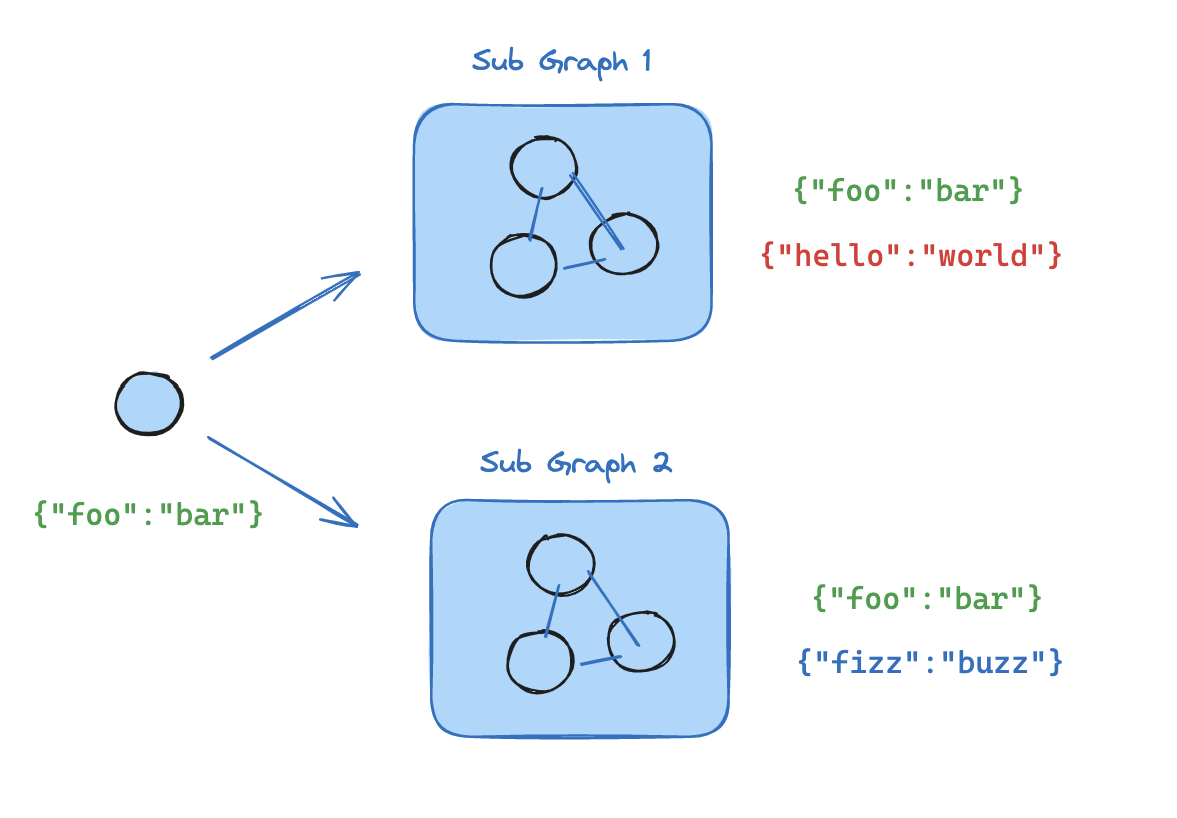
Some reasons for using subgraphs are:
使用子图的一些原因有:
- building multi-agent systems
构建多智能体系统 - when you want to reuse a set of nodes in multiple graphs
当你想在多个图中重用一组节点时 - when you want different teams to work on different parts of the graph independently, you can define each part as a subgraph, and as long as the subgraph interface (the input and output schemas) is respected, the parent graph can be built without knowing any details of the subgraph
当你想让不同的团队独立地处理图的不同部分时,你可以将每个部分定义为一个子图,只要子图接口(输入和输出模式)得到尊重,父图就可以在不了解子图任何细节的情况下构建
The main question when adding subgraphs is how the parent graph and subgraph communicate, i.e. how they pass the state between each other during the graph execution. There are two scenarios:
添加子图时主要的问题是父图和子图如何通信,即它们如何在图执行过程中相互传递状态。有两种场景:
- parent and subgraph have shared state keys in their state schemas. In this case, you can include the subgraph as a node in the parent graph
父图和子图在其状态模式中具有共享的状态键。在这种情况下,您可以将子图作为节点包含在父图中
from langgraph.graph import StateGraph, MessagesState, START

# Subgraph

def call_model(state: MessagesState):
    response = model.invoke(state["messages"])
    return {"messages": response}

subgraph_builder = StateGraph(State)
subgraph_builder.add_node(call_model)
...
subgraph = subgraph_builder.compile()

# Parent graph

builder = StateGraph(State)
builder.add_node("subgraph_node", subgraph)
builder.add_edge(START, "subgraph_node")
graph = builder.compile()
...
graph.invoke({"messages": [{"role": "user", "content": "hi!"}]})
- parent graph and subgraph have different schemas (no shared state keys in their state schemas). In this case, you have to call the subgraph from inside a node in the parent graph: this is useful when the parent graph and the subgraph have different state schemas and you need to transform state before or after calling the subgraph
父图和子图具有不同的模式(其状态模式中没有共享的状态键)。在这种情况下,您必须在父图中的某个节点内部调用子图:当父图和子图具有不同的状态模式并且您需要在调用子图之前或之后转换状态时,这很有用
from typing_extensions import TypedDict, Annotated
from langchain_core.messages import AnyMessage
from langgraph.graph import StateGraph, MessagesState, START
from langgraph.graph.message import add_messages

class SubgraphMessagesState(TypedDict):
    subgraph_messages: Annotated[list[AnyMessage], add_messages]

# Subgraph

def call_model(state: SubgraphMessagesState):
    response = model.invoke(state["subgraph_messages"])
    return {"subgraph_messages": response}

subgraph_builder = StateGraph(SubgraphMessagesState)
subgraph_builder.add_node("call_model_from_subgraph", call_model)
subgraph_builder.add_edge(START, "call_model_from_subgraph")
...
subgraph = subgraph_builder.compile()

# Parent graph

def call_subgraph(state: MessagesState):
    response = subgraph.invoke({"subgraph_messages": state["messages"]})
    return {"messages": response["subgraph_messages"]}

builder = StateGraph(State)
builder.add_node("subgraph_node", call_subgraph)
builder.add_edge(START, "subgraph_node")
graph = builder.compile()
...
graph.invoke({"messages": [{"role": "user", "content": "hi!"}]})