Agent development using prebuilt components
使用预构建组件进行代理开发 
LangGraph provides both low-level primitives and high-level prebuilt components for building agent-based applications.
LangGraph 为构建基于代理的应用程序提供了低级原语和高级预构建组件。
This section focuses on the prebuilt, ready-to-use components designed to help you construct agentic systems quickly and reliably—without the need to implement orchestration, memory, or human feedback handling from scratch.
本节重点介绍预构建的、即用型组件,这些组件旨在帮助您快速可靠地构建代理系统,而无需从头开始实现编排、内存或人工反馈处理。
What is an agent?
什么是代理人?
An agent consists of three components: a large language model (LLM), a set of tools it can use, and a prompt that provides instructions.
代理由三个组件组成:一个大型语言模型(LLM),一组它可以使用的工具 ,以及一个提供指令的提示符 。
The LLM operates in a loop. In each iteration, it selects a tool to invoke, provides input, receives the result (an observation), and uses that observation to inform the next action.
LLM 在循环中操作。在每次迭代中,它选择一个要调用的工具,提供输入,接收结果(观察),并使用该观察通知下一个操作。
The loop continues until a stopping condition is met — typically when the agent has gathered enough information to respond to the user.
循环继续,直到满足停止条件-通常是当代理收集了足够的信息来响应用户时。
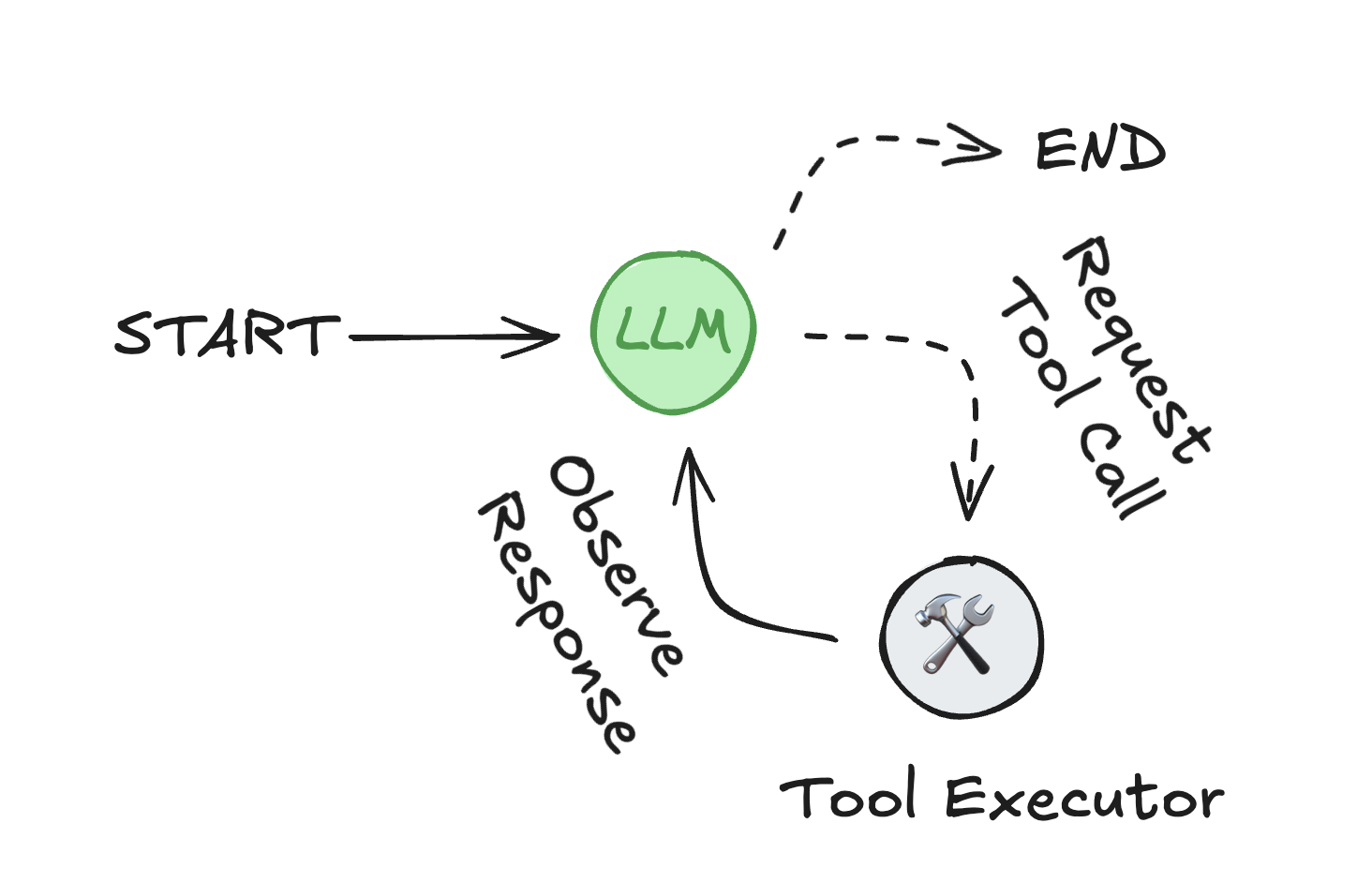
代理循环:LLM 选择工具并使用它们的输出来满足用户请求。
Key features
关键特性 
LangGraph includes several capabilities essential for building robust, production-ready agentic systems:
LangGraph 包括构建强大的生产就绪代理系统所必需的几个功能:
- Memory integration: Native support for short-term (session-based) and long-term (persistent across sessions) memory, enabling stateful behaviors in chatbots and assistants.
内存集成 :原生支持短期 (基于会话)和长期 (跨会话持久)内存,支持聊天机器人和助手中的有状态行为。 - Human-in-the-loop control: Execution can pause indefinitely to await human feedback—unlike websocket-based solutions limited to real-time interaction. This enables asynchronous approval, correction, or intervention at any point in the workflow.
人在回路控制 :执行可以无限期地暂停以等待人工反馈,这与基于 websocket 的解决方案仅限于实时交互不同。这可以在工作流中的任何点实现异步批准、更正或干预。 - Streaming support: Real-time streaming of agent state, model tokens, tool outputs, or combined streams.
流支持 :实时流代理状态、模型令牌、工具输出或组合流。 - Deployment tooling: Includes infrastructure-free deployment tools. LangGraph Platform supports testing, debugging, and deployment.
部署工具 :包括无基础架构的部署工具。LangGraph 平台支持测试、调试和部署。- Studio: A visual IDE for inspecting and debugging workflows.
Studio:用于检查和调试工作流的可视化 IDE。 - Supports multiple deployment options for production.
支持多种生产部署选项 。
- Studio: A visual IDE for inspecting and debugging workflows.
High-level building blocks
高级构建块 
LangGraph comes with a set of prebuilt components that implement common agent behaviors and workflows. These abstractions are built on top of the LangGraph framework, offering a faster path to production while remaining flexible for advanced customization.
LangGraph 附带了一组预构建的组件,用于实现常见的代理行为和工作流。这些抽象构建在 LangGraph 框架之上,提供了更快的生产路径,同时保持了高级定制的灵活性。
Using LangGraph for agent development allows you to focus on your application's logic and behavior, instead of building and maintaining the supporting infrastructure for state, memory, and human feedback.
使用 LangGraph 进行代理开发可以让您专注于应用程序的逻辑和行为,而不是构建和维护状态,内存和人工反馈的支持基础设施。
Package ecosystem
包生态系统 
The high-level components are organized into several packages, each with a specific focus.
高级组件被组织成几个包,每个包都有一个特定的焦点。
| Package 包 | Description 描述 | Installation 安装 |
|---|---|---|
langgraph-prebuilt (part of langgraph)langgraph-prebuilt(langgraph 的一部分) |
Prebuilt components to create agents 用于创建代理的预构建组件 |
pip install -U langgraph langchain |
langgraph-supervisor |
Tools for building supervisor agents 用于构建主管代理的工具 |
pip install -U langgraph-supervisor |
langgraph-swarm |
Tools for building a swarm multi-agent system 用于构建群多代理系统的工具 |
pip install -U langgraph-swarm |
langchain-mcp-adapters |
Interfaces to MCP servers for tool and resource integration 与 MCP 服务器的接口,用于工具和资源集成 |
pip install -U langchain-mcp-adapters |
langmem |
Agent memory management: short-term and long-term 智能体记忆管理: 短期和长期 |
pip install -U langmem |
agentevals |
Utilities to evaluate agent performance 用于评估座席性能的实用程序 |
pip install -U agentevals |
Visualize an agent graph
可视化代理图 
Use the following tool to visualize the graph generated by
create_react_agent
and to view an outline of the corresponding code.
It allows you to explore the infrastructure of the agent as defined by the presence of:
使用以下工具可视化由
创建反应代理
并查看相应代码的概要。
它允许您探索代理的基础架构,定义为存在:
tools: A list of tools (functions, APIs, or other callable objects) that the agent can use to perform tasks.tools:代理可用于执行任务的工具列表(函数、API 或其他可调用对象)。pre_model_hook: A function that is called before the model is invoked. It can be used to condense messages or perform other preprocessing tasks.pre_model_hook:在模型被调用之前调用的函数。它可用于压缩消息或执行其他预处理任务。post_model_hook: A function that is called after the model is invoked. It can be used to implement guardrails, human-in-the-loop flows, or other postprocessing tasks.post_model_hook:在模型被调用后调用的函数。它可用于实现护栏、人在回路流程或其他后处理任务。response_format: A data structure used to constrain the type of the final output, e.g., apydanticBaseModel.response_format:用于约束最终输出类型的数据结构,例如,pydanticBaseModel。
Features 特征
Graph 图

The following code snippet shows how to create the above agent (and underlying graph) with
create_react_agent:
下面的代码片段显示了如何使用
create_react_agent:
from langgraph.prebuilt import create_react_agent
from langchain_openai import ChatOpenAI
from pydantic import BaseModel

model = ChatOpenAI("o4-mini")

def tool() -> None:
    """Testing tool."""
    ...

def pre_model_hook() -> None:
    """Pre-model hook."""
    ...

def post_model_hook() -> None:
    """Post-model hook."""
    ...

class ResponseFormat(BaseModel):
    """Response format for the agent."""
    result: str

agent = create_react_agent(
    model,
    tools=[tool],
    pre_model_hook=pre_model_hook,
    post_model_hook=post_model_hook,
    response_format=ResponseFormat,
)

agent.get_graph().draw_mermaid_png()