Proxying Your Way to Code Execution – A Different Take on DLL Hijacking
通过代理实现代码执行——DLL 劫持的另一种方式

In the ever-evolving landscape of cybersecurity, attackers continually devise new methods to exploit vulnerabilities in endpoints to execute malicious code. One such method that has recently become more and more popular is DLL hijacking. While DLL hijacking attacks can take on many different forms, this blog post will explore a specific type of attack called DLL proxying, providing insights into how it works, the potential risks it poses, and briefly the methodology for discovering these vulnerable DLLs, which led to the discovery of several zero-day vulnerable DLLs that Microsoft has acknowledged but opted to not fix at this time. As we discuss the methodology, we will also examine how to easily weaponize these DLLs for covert attacks. To begin, let’s first briefly discuss what DLL hijacking is.
在不断发展的网络安全格局中,攻击者不断设计出新的方法来利用终端中的漏洞执行恶意代码。DLL 劫持是最近越来越流行的一种方法。虽然 DLL 劫持攻击有多种形式,但本文将探讨一种称为 DLL 代理的特定攻击类型,深入分析其工作原理、潜在风险,并简要介绍发现这些易受攻击的 DLL 的方法。这种方法导致发现了几个存在零日漏洞的 DLL,微软已承认这些漏洞,但目前选择不予修复。在讨论该方法的同时,我们还将研究如何轻松地利用这些 DLL 进行隐蔽攻击。首先,我们来简单讨论一下什么是 DLL 劫持。
What is DLL Hijacking?
什么是 DLL 劫持?
DLL hijacking encompasses numerous different techniques including DLL sidejacking and sideloading but at a high-level, DLL hijacking exploits the way Windows applications search for and load DLLs. When a process executes, it will look to load a series of DLLs in order to run properly. Sometimes a process will look in multiple locations on an endpoint before finding the right DLL, and in other cases, the DLL may not exist at all. By placing a malicious DLL in a location where the process will first look, an attacker can trick the process into loading their DLL instead of the legitimate one, allowing an attacker to execute arbitrary code with the same privileges as the running application. This technique is highly effective in circumventing security controls such as application allowlisting and even endpoint security controls, as valid (less scrutinized) applications load these DLLs as part of the application’s standard runtime procedure. In addition, by taking advantage of DLLs vulnerable to this, attackers can avoid the use of any Living off the Land binaries (LOLbins) to execute their malicious DLLs, which have been become the focus of a lot of detection-based products.
DLL 劫持包含多种不同的技术,包括 DLL 侧劫持和侧加载,但从总体上讲,DLL 劫持利用了 Windows 应用程序搜索和加载 DLL 的方式。进程执行时,为了正常运行,它会尝试加载一系列 DLL。有时,进程会在终端上的多个位置查找才能找到正确的 DLL;而在其他情况下,该 DLL 可能根本不存在。通过将恶意 DLL 放置在进程首先查找的位置,攻击者可以诱骗进程加载恶意 DLL 而不是合法 DLL,从而使攻击者能够以与正在运行的应用程序相同的权限执行任意代码。这种技术在规避应用程序允许列表等安全控制措施,甚至终端安全控制措施方面非常有效,因为合法(审查较少)的应用程序会将这些 DLL 加载到应用程序的标准运行时程序中。此外,通过利用易受此漏洞攻击的 DLL,攻击者可以避免使用任何 Living off the Land 二进制文件 (LOLbins) 来执行其恶意 DLL,而这些恶意 DLL 已成为许多基于检测的产品的关注重点。
While highly effective, this technique does have its pitfalls. By hijacking a required DLL, an attacker can make the process unstable, or in most cases, cause the application to have missing functionality which then disrupts operations. This can draw unwanted attention from users or sys admins, especially when attackers are trying to be covert. Another issue is that most of the folders that processes check for DLLs require elevated privileges to write to them. Because of this, I started looking at alternative ways to achieve this type of an attack. This led me down a huge rabbit hole of research, which led to discovering what I like to call DLL proxy attacks.
虽然这种技术非常有效,但也存在一些缺陷。通过劫持所需的 DLL,攻击者可以使进程不稳定,或者在大多数情况下导致应用程序缺少功能,从而中断运行。这可能会引起用户或系统管理员的注意,尤其是在攻击者试图隐蔽行动时。另一个问题是,大多数进程检查 DLL 的文件夹都需要提升权限才能写入。因此,我开始寻找实现此类攻击的其他方法。这让我陷入了巨大的研究困境,最终发现了我称之为“DLL 代理攻击”的东西。
What Are DLL Proxying Attacks?
什么是 DLL 代理攻击?
DLL proxying takes a different approach than traditional DLL hijacking. Rather than taking advantage of a process’s search order, DLL proxying relies on two things. The first is a misconfiguration in the access controls of the folder that the DLL exists in, that allow any user to write to the contents in that folder. This allows an attacker to drop a DLL into the same folder as the vulnerable DLL.
DLL 代理采用的方法与传统的 DLL 劫持不同。DLL 代理并非利用进程的搜索顺序,而是依赖于两个因素。首先,DLL 所在文件夹的访问控制配置错误,导致任何用户都可以写入该文件夹的内容。这使得攻击者可以将 DLL 放入存在漏洞的 DLL 所在的文件夹中。
Now, you can’t have two DLLs with the same name in the same folder, so with this write permission, we can rename the DLL to whatever we want. This is important for the second part, the proxying aspect. The idea behind this technique is to still allow access to the functions in the DLL we’re targeting. To do this, we need to forward all traffic from our malicious DLL to the legitimate one; this ensures that we do not disrupt the application’s operations. When the application attempts to load the DLL, it will load the malicious DLL instead, effectively allowing our malicious code to run, as well forward any of the function requests to the legitimate DLL without disrupting or crashing. This turns our malicious DLL into a proxy between the application and the legitimate DLL.
现在,您不能在同一个文件夹中拥有两个同名的 DLL,因此,有了此写入权限,我们可以将 DLL 重命名为任何我们想要的名称。这对于第二部分(代理方面)至关重要。此技术背后的想法是仍然允许访问我们目标 DLL 中的函数。为此,我们需要将所有来自恶意 DLL 的流量转发到合法 DLL;这确保我们不会中断应用程序的运行。当应用程序尝试加载 DLL 时,它将加载恶意 DLL,从而有效地允许我们的恶意代码运行,并将任何函数请求转发到合法 DLL,而不会中断或崩溃。这将我们的恶意 DLL 变成应用程序和合法 DLL 之间的代理。
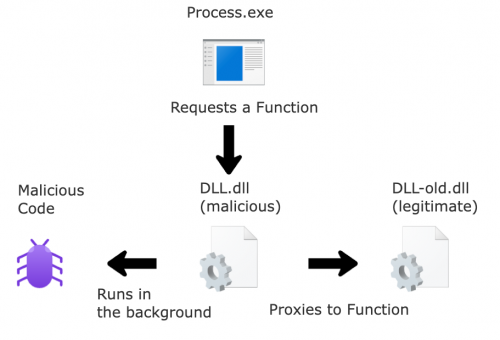
图 1 – DLL 代理攻击
DLL proxying attacks are extremely effective because they do not require elevated privileges to perform them. Typically, when a program installs DLLs, these files are placed in directories with strict security permissions. These permissions ensure that only users with administrative privileges can write to or rename files in these directories. This protection mechanism is crucial, as it prevents low-privilege users from introducing malicious DLLs into folders where legitimate DLLs are stored, thereby safeguarding the system from potential hijacking attempts.
DLL 代理攻击非常有效,因为它们不需要提升权限即可执行。通常,当程序安装 DLL 时,这些文件会被放置在具有严格安全权限的目录中。这些权限确保只有具有管理员权限的用户才能写入或重命名这些目录中的文件。这种保护机制至关重要,因为它可以防止低权限用户将恶意 DLL 引入存储合法 DLL 的文件夹中,从而保护系统免受潜在的劫持攻击。
Discovering Them 发现它们
Identifying DLLs that are vulnerable to DLL proxying is similar to finding hijackable DLLs. We need to look for any DLLs where a process loads when first executed. However, rather than missing DLLs or DLLs in a different path, we look for DLLs that get loaded at runtime and review the folder permissions. We do this by filtering out all locations we know are protected by default from allowing a low-privilege user from writing to them, such as System32 and any program files folders.
识别易受 DLL 代理攻击的 DLL 与查找可劫持的 DLL 类似。我们需要查找进程首次执行时加载的所有 DLL。然而,我们不会忽略缺失的 DLL 或位于其他路径的 DLL,而是查找在运行时加载的 DLL,并检查文件夹权限。为此,我们会过滤掉所有已知默认受保护的位置,以防止低权限用户对其进行写入,例如 System32 和任何程序文件文件夹。
One effective tool for this purpose is Process Monitor, a free tool for Windows that monitors and displays real-time file system, registry, and process/thread activity. Process Monitor can be used to observe an application’s ‘Load Image’ events, which occur when the application loads a DLL. By filtering out specific file locations, this makes it possible to identify DLLs that could be proxied.
一个有效的工具是进程监视器 (Process Monitor), 这是一款适用于 Windows 的免费工具,可以监视并显示实时文件系统、注册表以及进程/线程活动。进程监视器可用于观察应用程序的“加载映像”事件,该事件发生在应用程序加载 DLL 时。通过过滤特定的文件位置,可以识别可能被代理的 DLL。
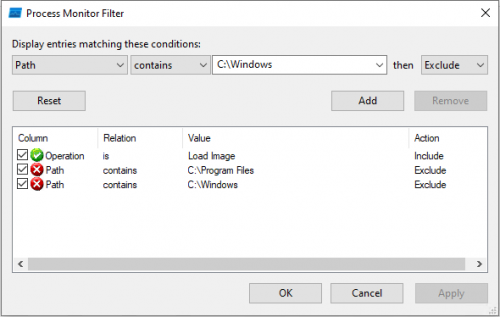
图 2 – 搜索过滤器
To begin hunting, we start by launching applications. With Microsoft Office products, there are a lot of cross compatibility and support between other applications, specifically Outlook and Teams. By monitoring these applications, I noticed that Outlook would load several DLLs from AppData. Digging deeper into these events, I discovered vulnerable DLLs (for proxying) existed in both Microsoft Teams version 2 (aka Microsoft Teams for Work and School) and Microsoft Teams Classic. When Microsoft Teams v2 is configured with a user’s profile, it installs a package called TeamsMeetingAddin into Outlook (If Outlook is installed). The folder containing the associated DLLs for this add-in can be modified by low-privilege users to both rename the legitimate DLLs and add malicious DLLs. This means that the next time Outlook is launched, the malicious DLL is loaded by Outlook, leading to code execution in the Outlook process. All files in this directory can be modified by a low-privilege user.
要开始搜寻,我们首先要启动应用程序。Microsoft Office 产品与其他应用程序之间存在大量的交叉兼容性和支持,尤其是 Outlook 和 Teams。通过监控这些应用程序,我注意到 Outlook 会从 AppData 加载多个 DLL。深入研究这些事件后,我发现 Microsoft Teams 版本 2(又名 Microsoft Teams for Work and School)和 Microsoft Teams Classic 中都存在易受攻击的 DLL(用于代理)。当使用用户的配置文件配置 Microsoft Teams v2 时,它会在 Outlook 中安装一个名为 TeamsMeetingAddin 的包(如果已安装 Outlook)。低权限用户可以修改包含此加载项关联 DLL 的文件夹,从而重命名合法 DLL 并添加恶意 DLL。这意味着下次启动 Outlook 时,恶意 DLL 会被 Outlook 加载,从而导致 Outlook 进程中的代码执行。低权限用户可以修改此目录中的所有文件。
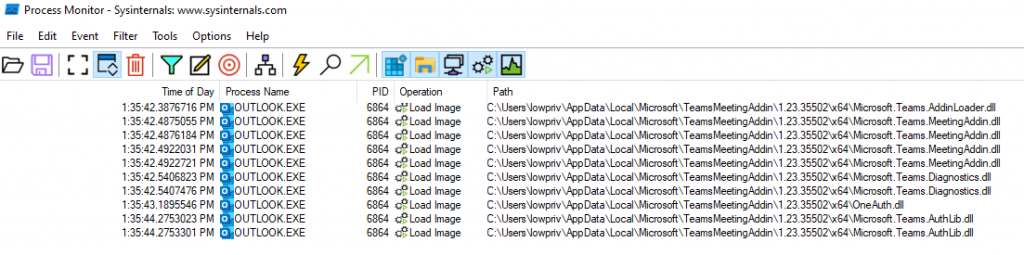
图 3 – 进程监视器结果 – Outlook.exe
The AppData folder in Windows is a hidden system directory used to store application-specific data and settings for individual user accounts. Each user account on a Windows system has its own AppData folder, which ensures that application data is kept separate and secure for each user. Because it’s focused on the user’s data, the user itself has permissions to write to anything in AppData. This makes it the perfect place to host malicious code and a very bad place to host legitimate DLLs that are used by processes. As we can see below, the folders where “TeamsMeetingAddin” exists is writeable by our low-privilege user.
Windows 中的 AppData 文件夹是一个隐藏的系统目录,用于存储特定于应用程序的数据和各个用户帐户的设置。Windows 系统上的每个用户帐户都有自己的 AppData 文件夹,这确保了每个用户的应用程序数据都独立且安全。由于该文件夹专注于用户数据,因此用户本身拥有写入 AppData 中任何内容的权限。这使得它成为托管恶意代码的理想场所,也成为托管进程使用的合法 DLL 的极不安全的地方。如下所示,低权限用户可以写入包含“TeamsMeetingAddin”的文件夹。
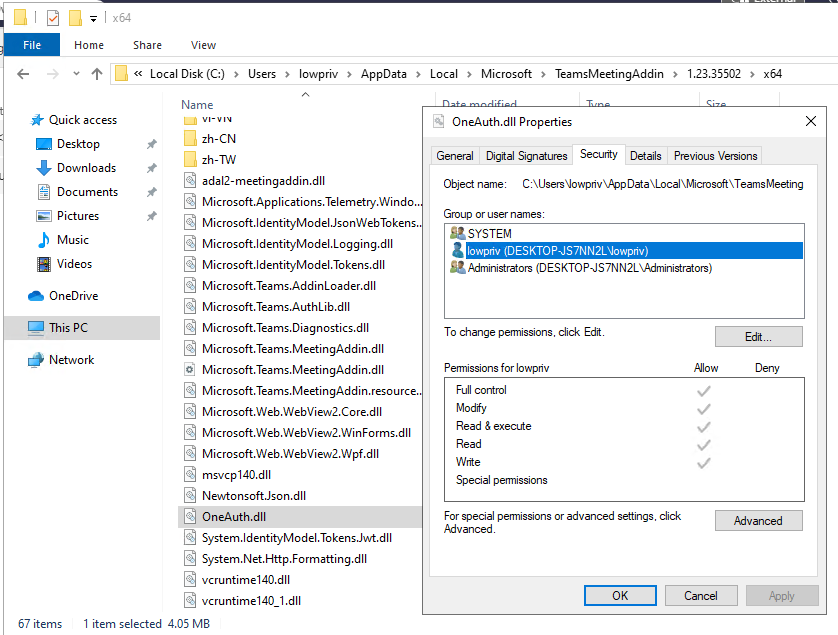
图 4 – OneAuth.dll 的安全权限
So now we have a DLL that we know is loaded at execution, the folder permissions allow us to write a new DLL into it, and we can rename any DLLs in that folder. The next step is to create the proxy functionality. This is where definition files (.def) come into play. Definition files are text files containing one or more module statements that describe various attributes of a DLL. Using a .def file we can define all the exported functions and map them to the legitimate DLL that contains requested function. Because of this, we can rename the legitimate DLL to whatever we want (in the example below, we append -legitimate to the name), place our DLL in the same folder, and when a process loads it, it proxies any requests for functions outlined below, to the requests to the legitimate one.
现在,我们已知一个 DLL 会在执行时加载,文件夹权限允许我们向其中写入新的 DLL,并且我们可以重命名该文件夹中的任何 DLL。下一步是创建代理功能。这时,定义文件 (.def) 就派上用场了。定义文件是包含一个或多个模块语句的文本文件,这些语句描述了 DLL 的各种属性。使用 .def 文件,我们可以定义所有导出函数,并将它们映射到包含所请求函数的合法 DLL。因此,我们可以将合法 DLL 重命名为任何我们想要的名称(在下面的示例中,我们在名称后附加 -legitimate),并将我们的 DLL 放在同一文件夹中,这样,当进程加载它时,它会将对下述函数的任何请求代理到对合法 DLL 的请求。
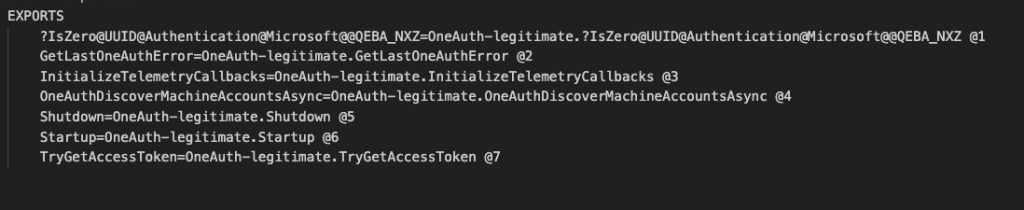
图 5 – 示例 – Def 文件
Because of this, only one DLL is ever loaded (not OneAuth.dll and OneAuth-legitimate/dll), but when we look at the DLL’s export functions, we can see that each of the proxy functions call back to OneAuth-legitmate.dll. In the example, below our OneAuth.dll will just pop up a simple hello world statement, showing our DLL is loaded. When we deep dive into this, we can see that the legitimate one is referenced in the exports.
因此,只有一个 DLL 会被加载(不是 OneAuth.dll 和 OneAuth-legitimate/dll),但当我们查看 DLL 的导出函数时,我们可以看到每个代理函数都回调到了 OneAuth-legitmate.dll。在下面的示例中,我们的 OneAuth.dll 只会弹出一个简单的 hello world 语句,显示我们的 DLL 已加载。深入研究后,我们可以看到导出函数中引用了合法的 DLL。
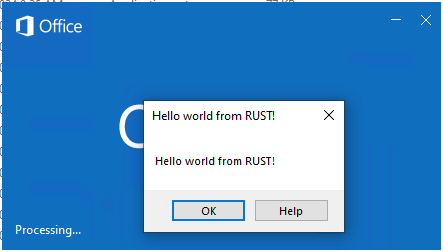
图 6 – 概念验证 – Outlook 弹出“Hello World”消息
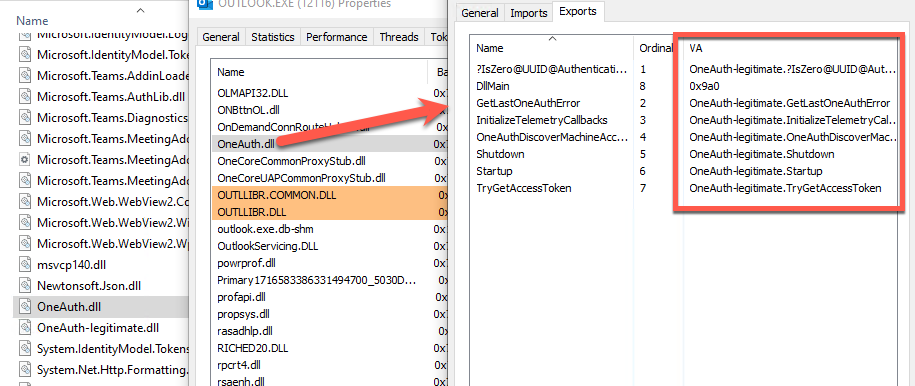
图 7 – 我们的邪恶 OneAuth.dll 将函数代理给合法的 OneAuth.dll
I’ve observed the following DLLs susceptible to this attack.
我观察到以下 DLL 容易受到这种攻击。
Microsoft Teams V2 or Microsoft Teams for Work or School
Microsoft Teams V2 或 Microsoft Teams for Work 或 School
- C:\Users\{username}\AppData\Local\Microsoft\TeamsMeetingAddin\{version}\x64\OneAuth.dll
C:\Users\{用户名}\AppData\Local\Microsoft\TeamsMeetingAddin\{版本}\x64\OneAuth.dll
Note: While reviewing numerous different versions of this plugin, I discovered that depending on the version, the folder name can change from TeamsMeetingAddin to TeamsMeetingAdd-in. I have been unable to get a straight answer as to why this happens, but it appears to be Microsoft Developer preference. (We will discuss more about this aspect in part two)
注意:在查看此插件的多个不同版本时,我发现根据版本的不同,文件夹名称可能会从 TeamsMeetingAddin 更改为 TeamsMeetingAdd-in。我无法直接找到原因,但这似乎是微软开发人员的偏好设置。(我们将在第二部分中详细讨论这个问题)
Microsoft Teams V1 or Microsoft Teams Classic
Microsoft Teams V1 或 Microsoft Teams Classic
- C:\Users\{username}\AppData\Local\Microsoft\Teams\current\ffmpeg.dll
C:\Users\{用户名}\AppData\Local\Microsoft\Teams\current\ffmpeg.dll
- C:\Users\{username}\AppData\Local\Microsoft\Teams\current\resources\app.asar.unpacked\node_modules\slimcore\bin\SlimCV.dll
C:\Users\{用户名}\AppData\Local\Microsoft\Teams\current\resources\app.asar.unpacked\node_modules\slimcore\bin\SlimCV.dll
Weaponizing Them 武器化他们
Once we have our DLL loaded into the process, we need something to trigger our code. Since we are proxying the functions to the legitimate DLL, the only way of running our malicious code is to put it in DLLMain function. Unfortunately, there can be issues with running your shellcode directly from DLLMain with DLLhijack attacks, specifically process deadlocking. Microsoft has documentation on DLL best practices (found here if you’re interested in reading further about this). One of their recommendations is to “Defer any calls in DllMain that can wait until later.” This statement gave me an idea to create a separate thread and then sleep it for 10 seconds. This ensures our malicious code only runs after everything else is loaded into the process. By doing so, we can help stay under the radar as, from the user’s perspective, there is no disruption of services or features.
将 DLL 加载到进程后,我们需要一些东西来触发代码。由于我们将函数代理到合法 DLL,因此运行恶意代码的唯一方法是将其放入 DLLMain 函数中。遗憾的是,直接从 DLLMain 运行 Shellcode 可能会引发 DLLhijack 攻击,特别是进程死锁。Microsoft 提供了有关 DLL 最佳实践的文档(如果您有兴趣进一步了解,可以在此处找到)。他们的建议之一是“ 推迟 DllMain 中可以稍后执行的任何调用 ”。这句话让我想到创建一个单独的线程,然后将其休眠 10 秒。这确保我们的恶意代码仅在其他所有内容加载到进程中后才运行。通过这样做,我们可以避免被检测到,因为从用户的角度来看,服务或功能不会中断。
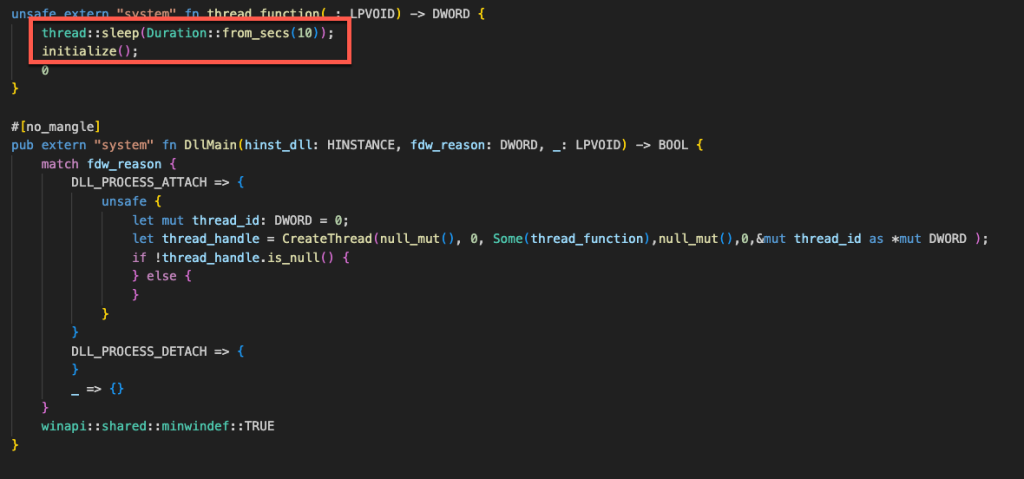
图 8 – 睡眠延迟代码
Impacts of DLL Proxying Attacks
DLL 代理攻击的影响
The impacts of DLL proxying attacks can be significant, as they allow attackers to bypass a variety of security controls. One of the key impacts is the ability to bypass application allowed listing. Application allowed listing is a security practice where only pre-approved applications are allowed to run on a system. Since the malicious code in a DLL proxying attack is loaded by a legitimate allowed application, it can often evade detection. Additionally, these attacks do not require any special permissions making them the perfect method for initial access.
DLL 代理攻击的影响可能非常巨大,因为它们允许攻击者绕过各种安全控制。其中一个关键影响是能够绕过应用程序允许列表。应用程序允许列表是一种安全措施,只允许预先批准的应用程序在系统上运行。由于 DLL 代理攻击中的恶意代码是由合法允许的应用程序加载的,因此它通常可以逃避检测。此外,这些攻击不需要任何特殊权限,使其成为初始访问的理想方法。
Microsoft’s Response 微软的回应
As of right now, Microsoft has no plans on fixing or remediating these issues but acknowledges them as valid vulnerabilities. Their official response:
截至目前,微软尚无修复或补救这些问题的计划,但承认它们是有效的漏洞。他们的官方回应:
We determined your finding is valid but does not meet our bar for immediate servicing because even though DLLs associated with this add-in it only provides a low/moderate risk. However, we’ve marked your finding for future review as an opportunity to improve our products. I do not have a timeline for this review. As no further action is required at this time, I am closing this case.
我们认为您的发现有效,但不符合我们立即提供服务的标准,因为即使与此插件相关的 DLL 也只带来低/中等风险。不过,我们已将您的发现标记为待审核,以便改进我们的产品。目前尚无审核时间表。由于目前无需采取进一步行动,我将结案。
Continuing this Research
继续这项研究
While the news from Microsoft was not ideal, after reviewing some documentations, I discovered Microsoft Outlook and Microsoft Teams Classic were being decommissioned for their new counterparts olk.exe and ms-teams.exe (aka Microsoft Teams V2). After some investigation, I discovered that the new versions contain several security controls that prevents medium integrity and elevated users from accessing the install path for these products, protecting it from DLL sideloading and hijack attacks. While these controls are in place, it is possible to bypass these controls and still have these applications load a malicious DLL from anywhere on the endpoint using the registry.
虽然微软的消息并不理想,但在查阅了一些文档后,我发现 Microsoft Outlook 和 Microsoft Teams Classic 已被其新版本 olk.exe 和 ms-teams.exe(又名 Microsoft Teams V2)取代。经过一番调查,我发现新版本包含多项安全控制措施,可防止中等完整性级别和高级用户访问这些产品的安装路径,从而保护其免受 DLL 侧载和劫持攻击。虽然这些控制措施已经到位,但仍有可能绕过这些控制措施,并让这些应用程序利用注册表从终端上的任何位置加载恶意 DLL。
To begin, we can see that these applications are installed in a different directory than the previous installations. This pathway, “C:\Program Files\WindowsApps\”, appeared to be heavily locked down. By attempting to access the folder to view the contents, we are denied access, even running as an Administrator.
首先,我们可以看到这些应用程序的安装目录与之前的安装目录不同。“C:\Program Files\WindowsApps\”这个路径似乎被严格锁定。当我们尝试访问该文件夹查看内容时,即使以管理员身份运行,也遭到拒绝。
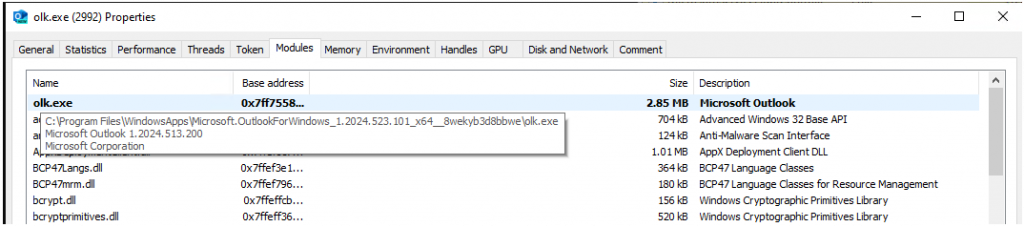
图 9 – Outlook OLK.exe 文件路径
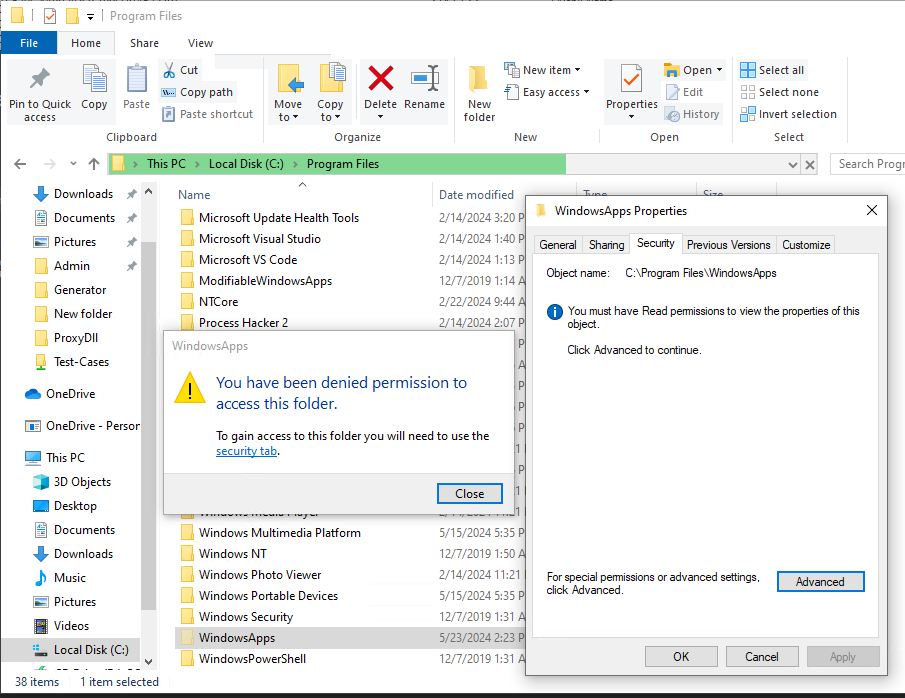
图 10 – 管理员无法查看文件夹的内容
As these applications do not have any third-party or external addons that reside in user-controlled areas (i.e. Appdata), it’s not possible to do any DLL hijacking attacks in the traditional sense. Even with elevated permissions, it’s not possible to access or write to these folders. This reduces the likelihood of exploiting these applications using traditional methods. However, if we monitor these applications starting up using Process Monitor, we can see that that these applications load several system DLLs using COM.
由于这些应用程序没有任何驻留在用户控制区域(例如 Appdata)的第三方或外部插件,因此无法以传统方式进行任何 DLL 劫持攻击。即使提升了权限,也无法访问或写入这些文件夹。这降低了使用传统方法利用这些应用程序的可能性。但是,如果我们使用 Process Monitor 监控这些应用程序的启动情况,我们可以看到它们使用 COM 加载了多个系统 DLL。
COM objects (Component Object Model objects) are a key part of Microsoft’s framework for enabling software components to communicate with each other, regardless of the language they are written in. COM objects support features such as interprocess communication, versioning, and dynamic object creation, which are essential for building complex distributed systems and applications in the Windows operating environment. In this case, these queries for COM are being used to find the path to certain system DLLs, to then load. What makes these requests interesting is that they first check the Current User (HKCU) section of the registry; however, they are unable to find the proper registry values and then fall over to another section of the registry where the entries exist.
COM 对象(组件对象模型对象)是 Microsoft 框架的重要组成部分,该框架使软件组件能够相互通信,无论它们使用何种语言编写。COM 对象支持进程间通信、版本控制和动态对象创建等功能,这些功能对于在 Windows 操作环境中构建复杂的分布式系统和应用程序至关重要。在本例中,这些 COM 查询用于查找某些系统 DLL 的路径,然后进行加载。这些请求的有趣之处在于,它们首先检查注册表的当前用户 (HKCU) 部分;然而,它们无法找到正确的注册表值,因此会转到注册表中存在这些条目的其他部分。

图 11 – 跟踪 OLK.exe 的 RegOpenKey 操作

图 12 – 包含 DLL 信息的注册表项
The HKEY_CURRENT_USER (HKCU) registry hive in Windows is a crucial component that stores configuration settings and preferences specific to the currently logged-in user. It includes information such as user-specific software settings, user interface configurations, and network connections, enabling a personalized experience for each user on a system. By isolating these settings from the broader system-wide configurations found in HKEY_LOCAL_MACHINE (HKLM), HKCU ensures that changes made by one user do not affect others. This means the current running user can read and write registry keys, even as a low-privilege user. Because of this, by adding a registry key containing the COM ID of the DLL the process is looking for in the HKCU\SOFTWARE\Classes\CLSID\, it is possible to have this process load a DLL from outside this WindowsApps or System32 folders.
Windows 中的 HKEY_CURRENT_USER (HKCU) 注册表配置单元是一个至关重要的组件,用于存储特定于当前登录用户的配置设置和首选项。它包含用户特定的软件设置、用户界面配置和网络连接等信息,从而为系统上的每位用户提供个性化体验。通过将这些设置与 HKEY_LOCAL_MACHINE (HKLM) 中更广泛的系统范围配置隔离,HKCU 可确保一个用户所做的更改不会影响其他用户。这意味着当前运行的用户即使以低权限用户身份也可以读取和写入注册表项。因此,通过在 HKCU\SOFTWARE\Classes\CLSID\ 中添加一个包含进程正在查找的 DLL 的 COM ID 的注册表项,就可以让此进程从 WindowsApps 或 System32 文件夹之外加载 DLL。
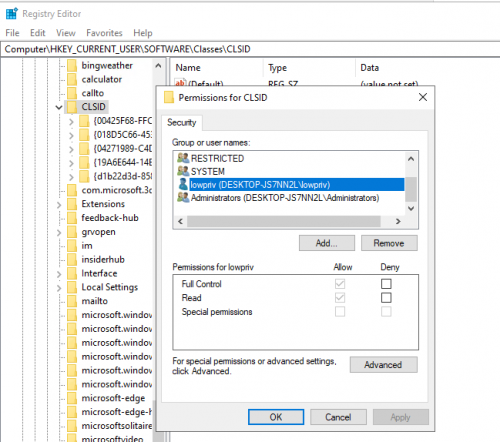
图 13 – CLSID 文件夹的权限 – 允许低权限用户访问
As a result, any time the application runs, the process would pragmatically load our DLL instead of the system’s version found in “C:\Windows\System32\”. While this is one example, numerous applications and DLLs are susceptible to this because applications are looking in the HKCU section of the registry first.
因此,每当应用程序运行时,进程都会加载我们的 DLL,而不是“C:\Windows\System32\”中的系统版本。虽然这只是一个例子,但许多应用程序和 DLL 都容易受到这种影响,因为应用程序首先会查找注册表的 HKCU 部分。
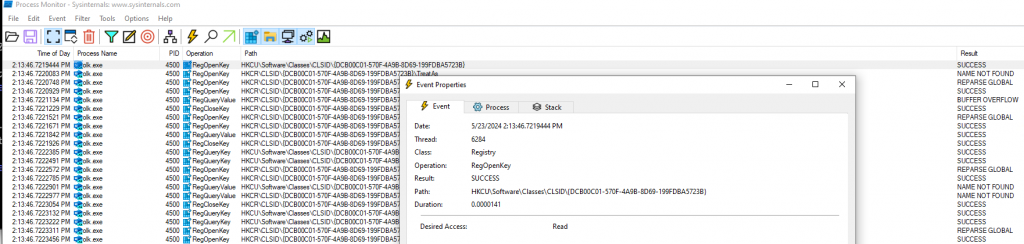
图 14 – OLK.exe 成功查询 HKCU COM 对象
As you can see from the image below, this works, and we are able to force the new version of Outlook to load our DLL. While we only have disclosed these new applications stored in the locked down WindowsApp folder, this issue is actually more widespread, affecting numerous other applications.
从下图可以看出,这种方法有效,我们能够强制新版 Outlook 加载我们的 DLL。虽然我们只披露了存储在锁定的 WindowsApp 文件夹中的这些新应用程序,但这个问题实际上更为普遍,影响了许多其他应用程序。
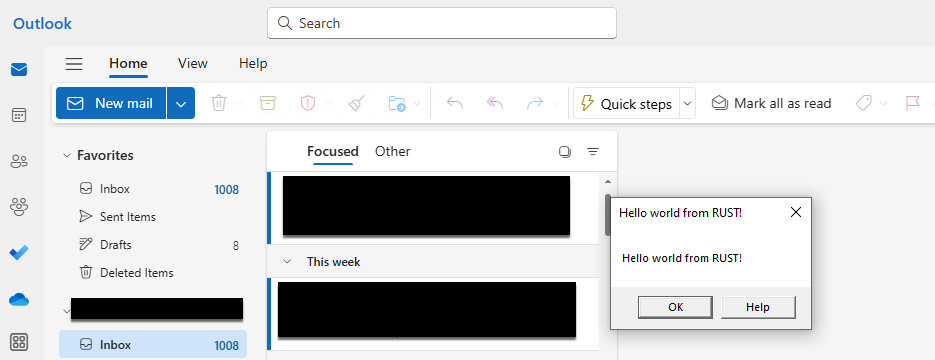
图 15 – 加载我们的 DLL,弹出一个消息窗口
To cast a wide net, we can use Process Monitor again, filtering to only look for any RegOpenKey Operations that start with “HKCU” and the result is “Name Not Found”. By monitoring for this, we can see what other applications that look for COM objects in HKCU that we can hijack. Over the course of a couple of hours of monitoring, it was discovered numerous applications that are native to the Windows system rely on querying these COM objects to load DLLs.
为了扩大搜索范围,我们可以再次使用进程监视器 ,筛选出以“HKCU”开头的 RegOpenKey 操作,结果为“未找到名称”。通过监控,我们可以发现还有哪些应用程序在 HKCU 中查找 COM 对象,以便我们可以劫持它们。经过几个小时的监控,我们发现许多 Windows 系统原生应用程序都依赖于查询这些 COM 对象来加载 DLL。
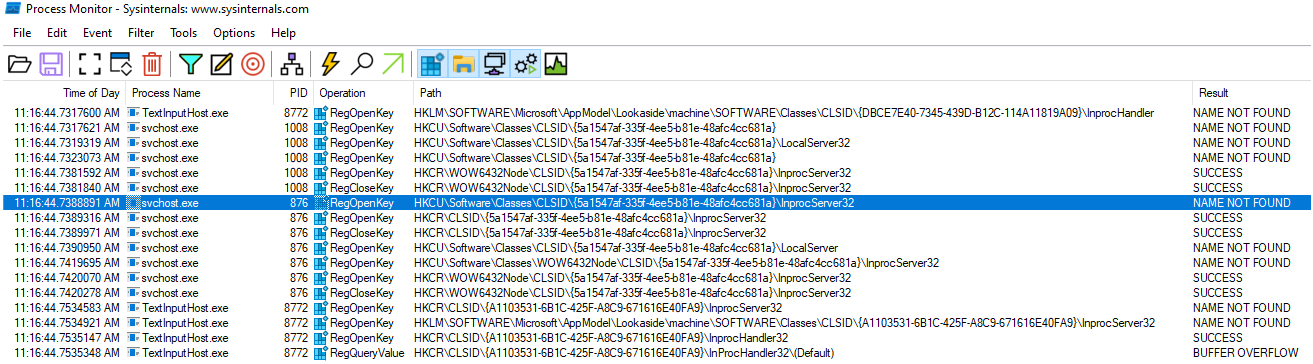
图 16 – 进程监视器显示其他进程执行相同的行为
With this extensive list of COM object UUIDs and the steps above, we can create numerous different POC DLLs that map to different DLL’s. By deploying these DLLs and registry keys in the HKCU\SOFTWARE\Classes\CLSID\ section of the registry of an endpoint with numerous applications typically found in a business, we can observe which other applications load these DLLs. The result was an even larger number of both native Windows and other applications. We can see this by monitoring for any Load Image operations from the folder containing our POC DLLs.
有了这份详尽的 COM 对象 UUID 列表以及上述步骤,我们可以创建许多不同的 POC DLL,并映射到不同的 DLL。通过在企业中通常包含大量应用程序的终端的注册表 HKCU\SOFTWARE\Classes\CLSID\ 部分中部署这些 DLL 和注册表项,我们可以观察到哪些其他应用程序加载了这些 DLL。结果发现,原生 Windows 和其他应用程序的数量甚至更多。我们可以通过监控包含 POC DLL 的文件夹中的任何“加载映像”操作来查看这一点。
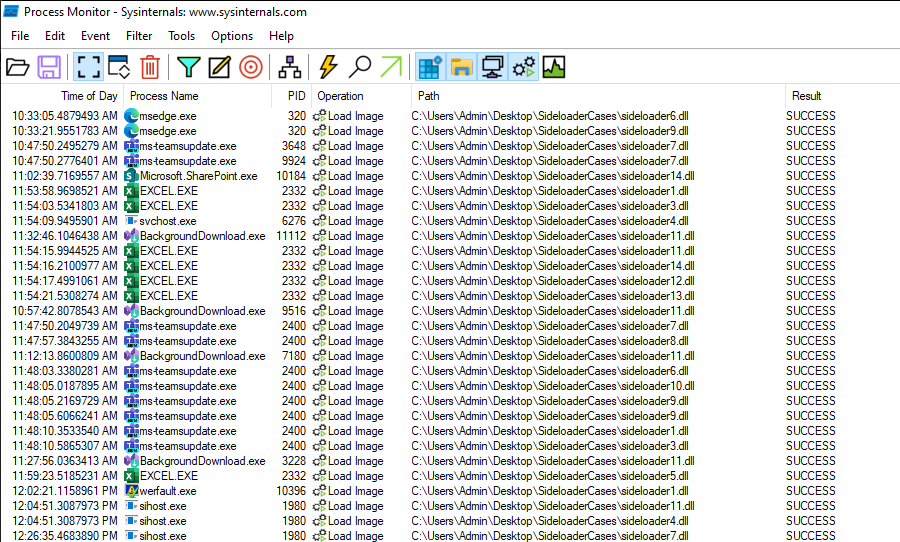
图 17 – 加载我们的 POC DLL 的进程
Putting This Into Action
付诸行动
Now the process of compiling and setting up these DLLs can be a bit arduous, so I have created a tool called FaceDancer to help automate this process. In the example below, I am going to choose to only target the process msedge. Using any DLL payload (in this case, I am using the vanilla DLL Cobalt Strike generates – with no evasion) of my choice, I can feed it into this tool, and it will generate me the following:
现在,编译和设置这些 DLL 的过程可能有点繁琐,所以我创建了一个名为 FaceDancer 的工具来帮助自动化这个过程。在下面的示例中,我将选择仅针对进程 msedge。我可以使用任意 DLL Payload(在本例中,我使用的是 Cobalt Strike 生成的原生 DLL,没有规避机制),将其输入到这个工具中,它将生成以下内容:
- The registry key settings I need to update.
我需要更新的注册表项设置。
- A DLL that will proxy the execution of a DLL msedge loads using COM.
将代理使用 COM 执行 DLL msedge 加载的 DLL。
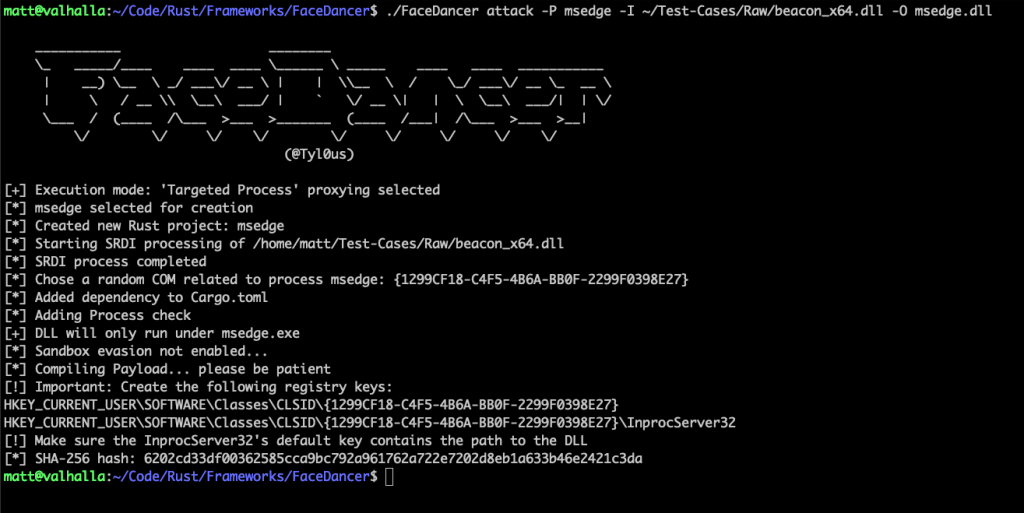
图 18 – FaceDancer 生成 DLL
Once the registry keys are set, it is just a matter of time before a new instance msedge.exe is executed:
一旦设置了注册表项,执行新的 msedge.exe 实例只是时间问题:
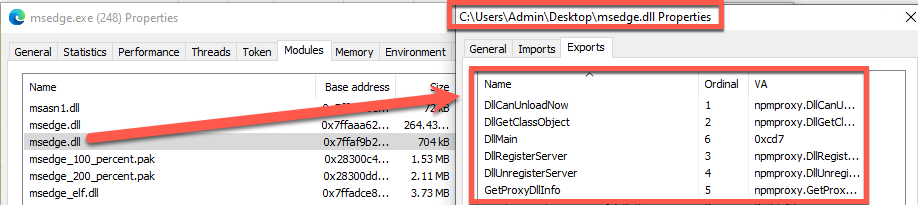
图 19 – Msedge 加载我们的 DLL
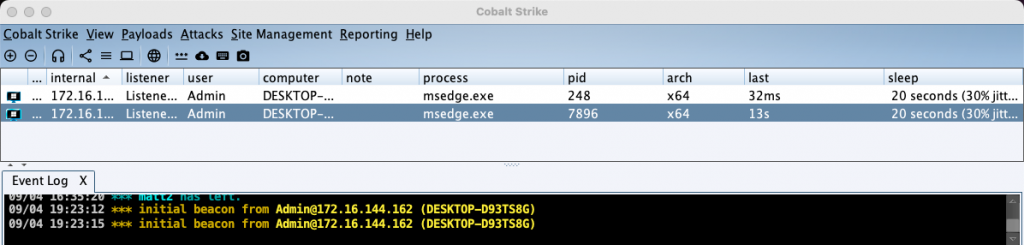
图 20 – 我们的 DLL 使用 Cobalt Strike 进行调用
Microsoft’s Second Response
微软的第二次回应
We reached out to Microsoft again, stressing the importance of these issues. Microsoft responded with the following:
我们再次联系微软,强调这些问题的重要性。微软的回复如下:
“Upon review this does not meet any of the categories of DLL planting issue that the MSRC services. For an attacker to leverage this to get code execution on a machine, they would have to already have code execution on the machine”
经审查,此漏洞不符合 MSRC 服务中列出的任何 DLL 植入漏洞类别。攻击者若要利用此漏洞在目标机器上执行代码,必须先在目标机器上执行代码。
What does this mean? Microsoft doesn’t recognize that these issues meet the requirements for what they consider DLL hijacking. Microsoft has its own terminology called DLL planting, which covers planting/hijacking/preloading DLL attacks. They primarily consider it a DLL planting if:
这是什么意思?微软不承认这些问题符合他们所认为的 DLL 劫持的条件。微软有自己的术语“DLL 植入”,涵盖植入/劫持/预加载 DLL 攻击。他们主要在以下情况下将其视为 DLL 植入:
- An application searches for and loads a DLL from an unsafe location.
应用程序从不安全的位置搜索并加载 DLL。
- The DLL is not located in the directory where the application expects it, causing Windows to search other directories.
DLL 不在应用程序期望的目录中,导致 Windows 搜索其他目录。
- An attacker can place a malicious DLL in a directory that is searched before the legitimate one.
攻击者可以将恶意 DLL 放置在合法 DLL 之前搜索的目录中。
As of right now, Microsoft will not be remediating or taking steps to mitigate this issue. What does this mean for businesses? Unfortunately, these vulnerabilities will remain as a forever-day until Microsoft changes its mind on recognizing these vulnerabilities as something worth fixing. As these processes are native to Windows and other applications such as Outlook and Teams, which are a critical part of day-to-day business, it makes it impossible for defenders to block these applications. Because of all of this, the only defensive measures that can be deployed are detection based.
截至目前,微软不会采取任何补救措施或措施来缓解此问题。这对企业意味着什么?不幸的是,这些漏洞将永远存在,直到微软改变主意,不再认为这些漏洞值得修复。由于这些进程是 Windows 和其他应用程序(例如 Outlook 和 Teams)的原生进程,而这些应用程序是日常业务的关键组成部分,因此防御者无法阻止这些应用程序。正因如此,唯一可以部署的防御措施是基于检测的。
Disclosure Timeline 披露时间表
April 17th – Disclosed the first discovery to Microsoft.
4 月 17 日 ——向微软披露第一个发现。
April 25th – Received the following response from Microsoft, stating it’s a valid zero-day but will not fix it.
4 月 25 日 – 收到微软的以下回复,称这是一个有效的零日漏洞,但不会修复它。
April 26th – Requested a review of their stance and provided more information.
4 月 26 日 ——要求审查他们的立场并提供更多信息。
April 26th – Received a message that no further action would be taken, and no CVE recognition would occur.
4 月 26 日 ——收到消息称不会采取进一步行动,也不会发生 CVE 识别。
July 24th – Disclosed the second discovery to Microsoft.
7 月 24 日 -向微软披露第二个发现。
August 1st – Case closed.
8 月 1 日 ——案件结案。
More information about FaceDancer can be found here: https://github.com/Tylous/FaceDancer
有关 FaceDancer 的更多信息,请参见: https://github.com/Tylous/FaceDancer
Loved this blog? 喜欢这个博客吗?
Join us for a free one-hour Black Hills Information Security (BHIS) webcast with the author, Matt Eidelberg, as he share his latest research into new techniques which allow Windows users to side-load into native Windows processes.
加入我们与作者 Matt Eidelberg 进行的免费一小时 Black Hills 信息安全 (BHIS) 网络广播,听他分享他对允许 Windows 用户侧载到本机 Windows 进程的新技术的最新研究。
Learn more and register below:
了解更多信息并在下面注册:
DLL Hijacking – A New Spin on Proxying Your Shellcode
DLL 劫持——代理 Shellcode 的新方法