

TLDR: We’re excited to announce a new LangChain template for helping with research, heavily inspired by and in collaboration with the GPT Researcher team. We are excited about this because it is one of the best performing, long-running, general, non-chat “cognitive architectures” that we’ve seen.
TLDR:我们很高兴宣布一个用于辅助研究的新 LangChain 模板,该模板深受 GPT Researcher 团队的启发并与其合作。我们对此感到兴奋,因为它是我们所见到的表现最佳、持续时间最长、通用性最强、非聊天类的“认知架构”之一。
Key Links: 关键链接:
- Access the “research assistant” template here
在此处访问“研究助理”模板 - Watch us code the "research assistant" from scratch here
在此处观看我们从零开始编写“研究助理”
The Downside of Chat 聊天应用的缺点
Most LLM applications so far have been chat based. This isn’t terribly surprising - ChatGPT is the fastest growing consumer application, and chat is a reasonable UX (allows for back and forth, is a natural medium). However, chat as a UX also has some downsides, and can often make it harder to create highly performant applications.
迄今为止,大多数 LLM 应用都是基于聊天的。这并不令人意外——ChatGPT 是最快增长的消费应用之一,而聊天是一种合理的用户体验(允许来回交流,是一种自然的中介)。然而,作为用户体验的聊天也有一些缺点,并且通常会使创建高性能应用变得更加困难。
Latency Expectations 延迟预期
The main downside are the latency expectations that come with chat. When you are using a chat application, there is a certain expectation you have as a user around the latency of that application. Specifically, you expect a quick response.
主要缺点是聊天带来的延迟预期。当你使用聊天应用时,作为用户,你对该应用的延迟有一个特定的预期。具体来说,你期望快速响应。
This is why streaming is an incredibly important functionality in LLM applications - it gives the illusion of a fast response and shows progress.
这就是为什么流式处理是 LLM 应用中极其重要的功能——它给人一种快速响应的错觉,并显示进度。
These latency expectations mean that it is tough to do too much work behind the scenes - the more work you do, the longer it will take to generate a response. This is a bit problematic - the major issue with LLM application is their accuracy/performance, and one main way to increase is the spend more time breaking down the process into individual steps, running more checks, etc. However, all these additional steps greatly increase latency.
这些延迟预期意味着在幕后做太多工作是非常困难的——你做得越多,生成响应所需的时间就越长。这有点成问题——LLM 应用的主要问题在于它们的准确性/性能,而提高准确性的主要方法之一是花费更多时间将过程分解为单个步骤,进行更多检查等。然而,所有这些额外的步骤都会大大增加延迟。
We often talk to teams who try to balance these two considerations, which can at points be contradictory. While working in a chat UX, for complex reasoning tasks it’s tough to get a highly accurate and helpful response in the time that is expected
我们经常与试图平衡这两方面考量的团队交谈,这两方面有时会相互矛盾。在聊天 UX 中工作时,对于复杂的推理任务,在预期的时间内很难得到高度准确和有帮助的响应。
Output Format
Chat is great for messages. It’s less great for things that don’t really belong in messages - like long papers or code files, or multiple files. While working with a chat UX, displaying results as messages can often make them tougher to review or consume.
聊天非常适合发送消息。但对于不属于消息内容的东西,比如长篇论文或代码文件,或者多个文件,它就不那么理想了。在使用聊天界面时,将结果以消息形式展示,往往会让它们更难审查或消费。
Human in the Loop 人工参与
LLMs are not (yet) highly accurate, and so most applications heavily feature humans in the loop. This makes sense - only use the LLM in small bursts, and then have a human check/validate its output and ask for a followup.
LLMs 目前还不够精确,因此大多数应用都高度依赖人工参与。这是有道理的——只在需要时使用 LLM,然后由人工检查/验证其输出,并要求进一步处理。
However, there is a balance to strike here. If the human needs to be too much in the loop, then it’s not actually saving them time! But you can’t take the human out of the loop completely - again, LLMs just aren’t reliable enough for this.
然而,这里需要找到一个平衡点。如果人工参与过多,那么实际上并没有节省时间!但你也无法完全取消人工参与——LLMs 目前还不足以做到这一点。
The key is in finding UXs where you can ask the LLM to do a large amount of work, but it results in something that is still not expected to be a perfect output.
关键在于找到那些你可以让 LLM 做大量工作,但结果仍然不被期望是完美输出的 UX。
Non-Chat Projects 非聊天项目
There are a number of projects that we are excited about that do not use chat as a primary medium. Highlighting a few below:
我们有很多令人兴奋的项目,它们不以聊天为主要媒介。以下列举几个:
This project has a small chat component (asking clarifying questions) afterwords runs autonomously and generates code files. This has humans in the loop at key points:
该项目有一个小的聊天组件(用于询问澄清问题),之后会自主运行并生成代码文件。这使人类在关键节点上参与其中:
- Clarifying questions: early on, gather requirements
澄清问题:早期收集需求 - At the end, when you can inspect the code
最后,当你可以检查代码时
The final generated code can easily be modified by the user, so it’s more of a first draft than anything. The output is Python files - far more natural than outputing in chat.
最终生成的代码可以轻松被用户修改,所以它更像是一个初稿。输出的是 Python 文件——比在聊天中输出更自然。
There’s no expectation that files are generated automatically - if I were to ask a colleague to write some code, I wouldn’t expect them to continuously message me their progress! I’d expect them to go off for a while, do some work, and then I’d check in - exactly the UX here.
没有期望文件能自动生成——如果我要请同事写一些代码,我不会期望他们不断发消息给我进度!我期望他们先离开一段时间,做些工作,然后我会检查——这正是这里的用户体验。
This bot has been patrolling our GitHub repo and responding to issues. Users do not interact with it through chat, but rather through GitHub issues.
这个机器人一直在我们的 GitHub 仓库中巡逻并回复问题。用户不是通过聊天与之互动,而是通过 GitHub 问题来互动。
The expectation for response time on GitHub issues is FAR higher than that of chat, allowing plenty of time for DosuBot to go do its thing. Its outputs are not expected to be perfect artifacts either - they are merely replies to users.
对于 GitHub 问题的响应时间预期远高于聊天,这给了 DosuBot 充足的时间去做它该做的事情。它的输出也不被期望是完美的成果——它们仅仅是回复给用户的。
The users are very much in the loop to take them and implement them as they see fit.
用户完全了解并可以按自己的方式采纳并实施它们。
We’ve discussed this project before (and will discuss it far more in the next section, as “Research Assistants” are heavily based on it). This project writes full research reports.
我们之前讨论过这个项目(在下一节中,我们将更深入地讨论它,因为“研究助理”项目很大程度上基于它)。这个项目可以撰写完整的研究报告。
It saves files that are generated - just as we would save research reports (we wouldn’t message them in chat to each other)! It takes a while to run - but that’s totally fine.
它保存生成的文件——就像我们会保存研究报告一样(我们不会在聊天中互相发送研究报告)!运行需要一些时间——但这完全没问题。
If I asked a colleague to write me a research report, I wouldn’t expect anything close to an instantaneous response. It’s outputs can easily be inspected and modified, and used as a first draft - no expectation of a complete output.
如果我请同事帮我写一份研究报告,我不会期望得到近乎即时的回复。它的输出可以轻松检查和修改,并用作初稿——不期望得到完整的输出。
All of these projects buck the trend of chat based UXs. They bite off larger and larger chunks of work - rather than answer a single question that you can use in a research report, they write the research report for you!
所有这些项目都违背了基于聊天的用户体验趋势。它们承担越来越大的工作量——而不是回答一个你可以用于研究报告的单个问题,它们直接为你撰写研究报告!
The final response is often best served not as a chat message but some other file, and these can easily be modified, so there is still a human-in-the-loop component.
最终的回应往往不是以聊天消息的形式呈现,而是以其他文件形式,这些文件可以轻易被修改,因此仍然存在人工参与环节。
These project’s aren’t just exciting because they don’t use chat. They are exciting because they are some of the most useful applications we see, and that be precisely because they do not use chat.
这些项目之所以令人兴奋,并不仅仅是因为它们不使用聊天功能。它们令人兴奋,是因为它们是我们所看到的最有用的应用之一,而这恰恰是因为它们不使用聊天功能。
Research Assistant 研究助理
A few weeks ago we introduced LangChain Templates - a collection of reference architectures that are the quickest way to get started with a GenAI application. Most of these revolved around chat.
几周前,我们介绍了 LangChain 模板——这是一系列参考架构的集合,是快速开始 GenAI 应用的捷径。其中大部分都围绕着聊天展开。
However, some of the most interesting and useful applications we see (including the ones above) do not use chat as the primary interface.
然而,我们看到的一些最有趣和最有用的应用(包括上面提到的)并不以聊天作为主要界面。
We wanted to begin to add templates that were not chat based. We have worked closely with the GPT-Researcher team in the past and think they have a fantastic use case. As such, we worked with them to add a “Research Assistant” template to LangChain Templates, making it easy to get started with this template completely in the LangChain ecosystem.
我们希望开始添加非聊天基础的模板。过去我们与 GPT-Researcher 团队紧密合作,认为他们有一个绝佳的应用案例。因此,我们与该团队合作,为 LangChain 模板添加了一个“研究助理”模板,使其能够完全在 LangChain 生态系统中轻松开始使用这个模板。
Note: they also recently released a major new version - check it out.
注意:他们最近也发布了一个重大新版本——可以去看看。
What does this application do under the hood? The “cognitive architecture” can be broken down into a few steps:
这个应用程序在底层是如何运作的?“认知架构”可以分解为几个步骤:
- User inputs question/topic to write about
用户输入要撰写的问题/主题 - Generate a bunch of sub questions
生成一系列子问题 - For each sub question: research that subquestion and get relevant documents, then summarize those documents with respect to the subquestion
针对每个子问题:研究该子问题并获取相关文档,然后根据子问题总结这些文档 - Take the summaries for each subquestion, and combine them into the final report.
将每个子问题的总结合并成最终报告 - Output Final Report 输出最终报告
Each of these pieces is modular, making it a perfect fit for the LangChain ecosystem
每件作品都是模块化的,非常适合 LangChain 生态系统
- Swap out the prompt and/or the LLM used to generate the subquestions
替换用于生成子问题的提示和/或 LLM - Swap out the retriever used to fetch relevant documents
替换用于获取相关文档的检索器 - Swap out the prompt and/or the LLM used to generate the final report
替换用于生成最终报告的提示和/或 LLM
By default, the template uses OpenAI for the LLM, and Tavily for the search engine. Tavily is a search engine made by the GPT-Researcher team, and is optimized for AI workloads. Specifically, the Tavily API optimizes for RAG.
默认情况下,模板使用 OpenAI 作为 LLM,以及 Tavily 作为搜索引擎。Tavily 是由 GPT-Researcher 团队开发的搜索引擎,专为 AI 工作负载优化。具体来说,Tavily API 针对 RAG 进行了优化。
They optimize for getting the most factual and relevant information to insert in any RAG pipeline that will maximize LLM reasoning and output. This allows for an easy-to-use experience of searching the web.
他们优化以获取最准确和相关的信息,以便插入任何 RAG 管道中,从而最大化 LLM 推理和输出。这使得搜索网络体验变得简单易用。
However, it can easily be modified to point to our Arxiv Retriever, or our PubMed Retriever, and quickly turned into a research assistant for those sites. It can equally easily be pointed to a vectorstore containing your relevant information.
然而,它可以轻松地修改为指向我们的 Arxiv 检索器,或我们的 PubMed 检索器,并迅速转变为这些网站的科研助手。它同样可以轻松地指向包含您相关信息的向量存储。
This architecture is doing a LOT under the hood. Another big benefit of integrating this into the LangChain ecosystem is that you can get best-in-class observability for this architecture through LangSmith. With LangSmith, you can see all the many steps, and inspect the inputs and outputs at each one
这个架构在底层做了大量工作。将此集成到 LangChain 生态系统的另一个巨大好处是,你可以通过 LangSmith 获得该架构的最佳级可观察性。使用 LangSmith,你可以看到所有许多步骤,并检查每个步骤的输入和输出。
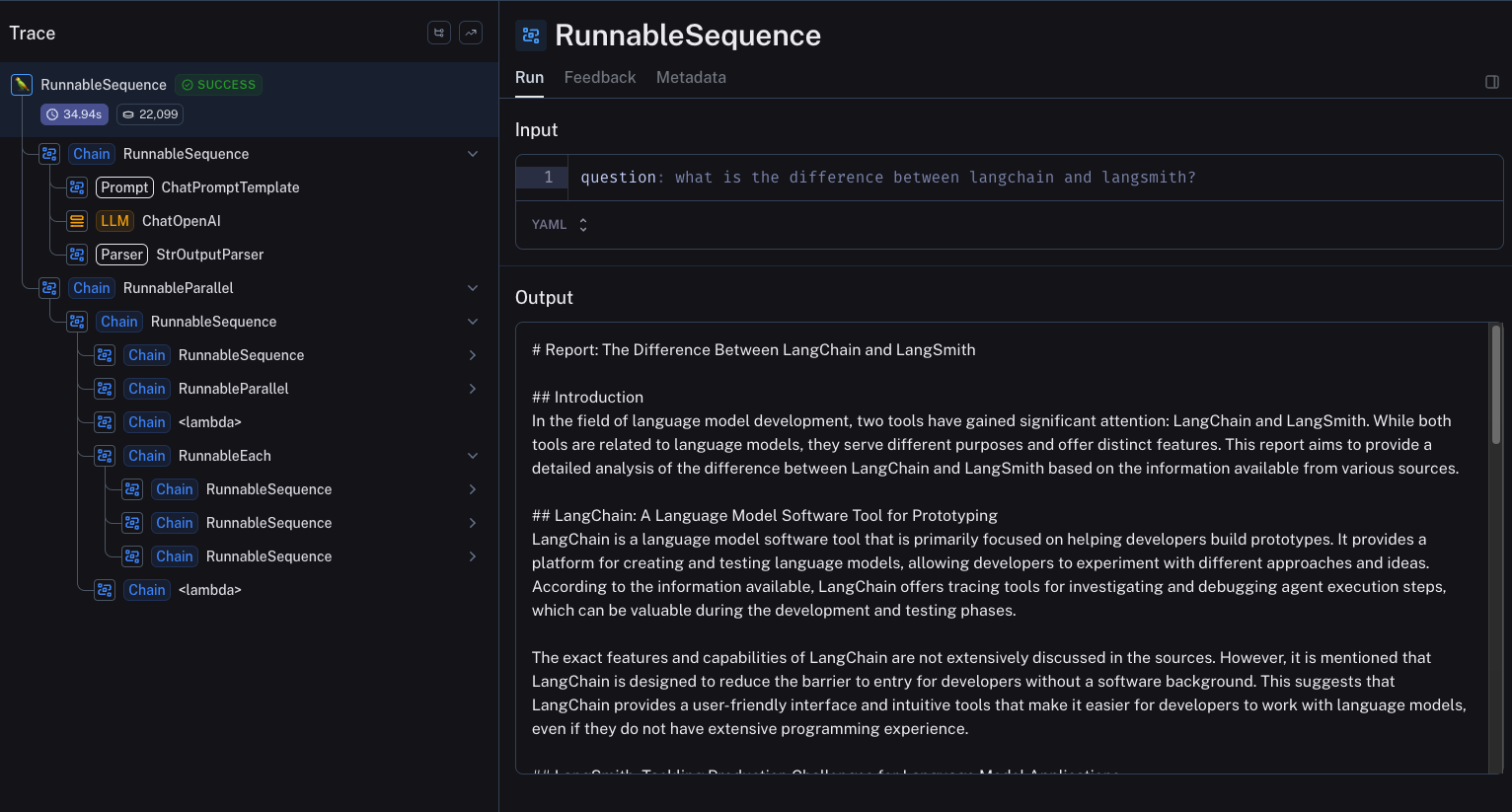
You can explore this example trace here.
你可以在这里探索这个示例轨迹。
Conclusion 结论
While the GenAI space so far has been dominated by application with chat UXs, we are bullish on the most useful autonomous systems being longer running ones. So is Assaf Elovic, the creator of GPT-Researcher:
虽然到目前为止,GenAI 领域主要是由具有聊天 UX 的应用主导,但我们看好最有用的自主系统是运行时间更长的系统。Assaf Elovic,GPT-Researcher 的创造者,也持相同观点:
As AI improves, so will automation grow over time, and user behavior will only grow to demand it more and more from products.
随着 AI 的改进,自动化将随着时间的推移而发展,用户行为也将越来越要求产品提供这种功能。
And with automation growing, user expectation will change, moving less from immediate response/feedback and more to the ability to get high quality results.
随着自动化的增长,用户期望也将改变,从即时响应/反馈转向更注重获得高质量结果的能力。
Because of this, there is room and need for much more sophisticated AI applications that might take longer to complete, but aim at maximizing quality of RAG and content generation.
因此,存在并且需要更复杂的 AI 应用,这些应用可能需要更长时间来完成,但旨在最大化 RAG 和内容生成的质量。
This is also relates to autonomous agent frameworks that will run in the background to complete complex tasks.
这也与将在后台运行以完成复杂任务的自主代理框架有关。
GPT-Researcher is a perfect example of this, and we’re excited to have worked with them to bring this “research assistant” template to fruition. Play around with it here and let us know your thoughts!
GPT-Researcher 是这方面的完美例子,我们很高兴能与他们合作,将这个“研究助理”模板变为现实。在这里尝试一下,并告诉我们你的想法!