

The use of AI in software engineering has evolved over the past two years. It started as autocomplete, then went to a copilot in an IDE, and in the fast few months has evolved to be a long running, more end-to-end agent that run asynchronously in the cloud.
人工智能在软件工程中的应用在过去两年中不断发展。它最初是作为自动补全功能出现的,然后演变为 IDE 中的协作者,并在短短几个月内进一步发展成为在云端异步运行的长时运行、端到端代理。
We believe that all agents will long more like this in the future - long running, asynchronous, more autonomous. Specifically, we think that they will:
我们相信,未来的所有代理都将更像是这样——长时运行、异步、更加自主。具体来说,我们认为它们将:
- Run asynchronously in the cloud
在云端异步运行 - Integrate directly with your tooling
直接集成到您的工具中 - Have enough context over your environment to properly plan tasks over longer time horizons
对环境有足够的了解,以便能够为更长的时间范围规划任务 - Review their own work (and fix any issues) before completing their task
在完成任务之前,先检查自己的工作(并修复任何问题)
Over the past few months it became apparent that software engineering was the first discipline where this vision would become a reality. Yet there was no open source project that captured these characteristics.
在过去几个月里,很明显软件工程是第一个将这一愿景变为现实的学科。然而,并没有开源项目能够体现这些特点。
So we built Open SWE, the first open-source, async, cloud-hosted coding agent. It connects directly to your GitHub repositories, allowing you to delegate tasks from GitHub issues or our custom UI. Open SWE operates like another engineer on your team: it can research a codebase, create a detailed execution plan, write code, run tests, review its own work for errors, and open a pull request when it's finished.
因此,我们创建了 Open SWE,第一个开源的异步云端编码代理。它可以直接连接到你的 GitHub 仓库,允许你从 GitHub 问题或我们的自定义界面中分配任务。Open SWE 就像你团队中的另一位工程师一样运作:它可以研究代码库,创建详细的执行计划,编写代码,运行测试,检查自己的工作以发现错误,并在完成后提交拉取请求。
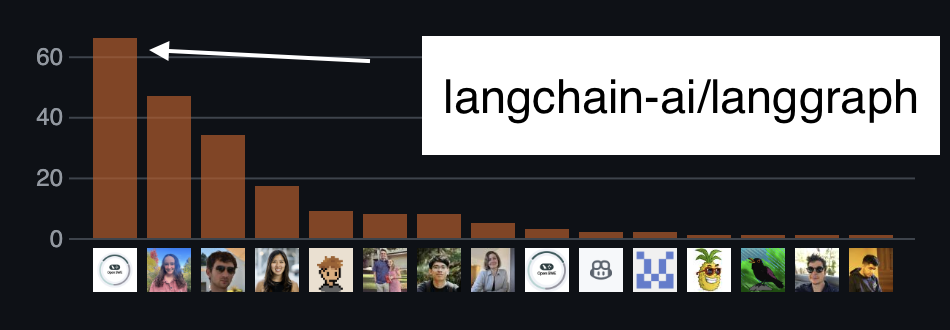
Open SWE 对 LangGraph 仓库的贡献
We've been using it internally to accelerate our own development on projects like LangGraph, and the Open SWE repo itself where it’s already a top contributor.
我们一直在内部使用它来加速我们在 LangGraph 等项目上的开发,以及在 Open SWE 仓库本身,它已经是主要的贡献者之一。
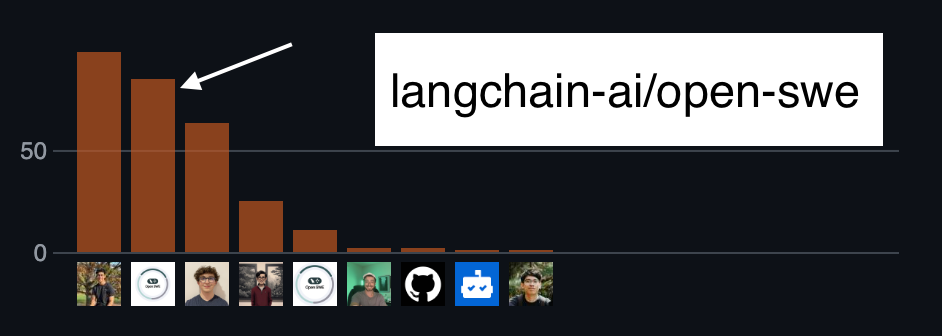
Open SWE 对其自身仓库的贡献
Today, we're excited to share it with the community.
今天,我们很高兴能与社区分享它。
How to Use It 如何使用
You can get started with the hosted version of Open SWE in minutes. All you need is an Anthropic API key.
您可以在几分钟内开始使用 Open SWE 的托管版本。您只需要一个 Anthropic API 密钥。
- Visit swe.langchain.com. 访问 swe.langchain.com。
- Connect your GitHub account and select the repositories you want Open SWE to access.
连接您的 GitHub 账户并选择您希望 Open SWE 访问的仓库。 - Provide your Anthropic API key in settings.
在设置中提供您的 Anthropic API 密钥。 - Start a new task and watch it go!
开始一个新任务并观察它进行!
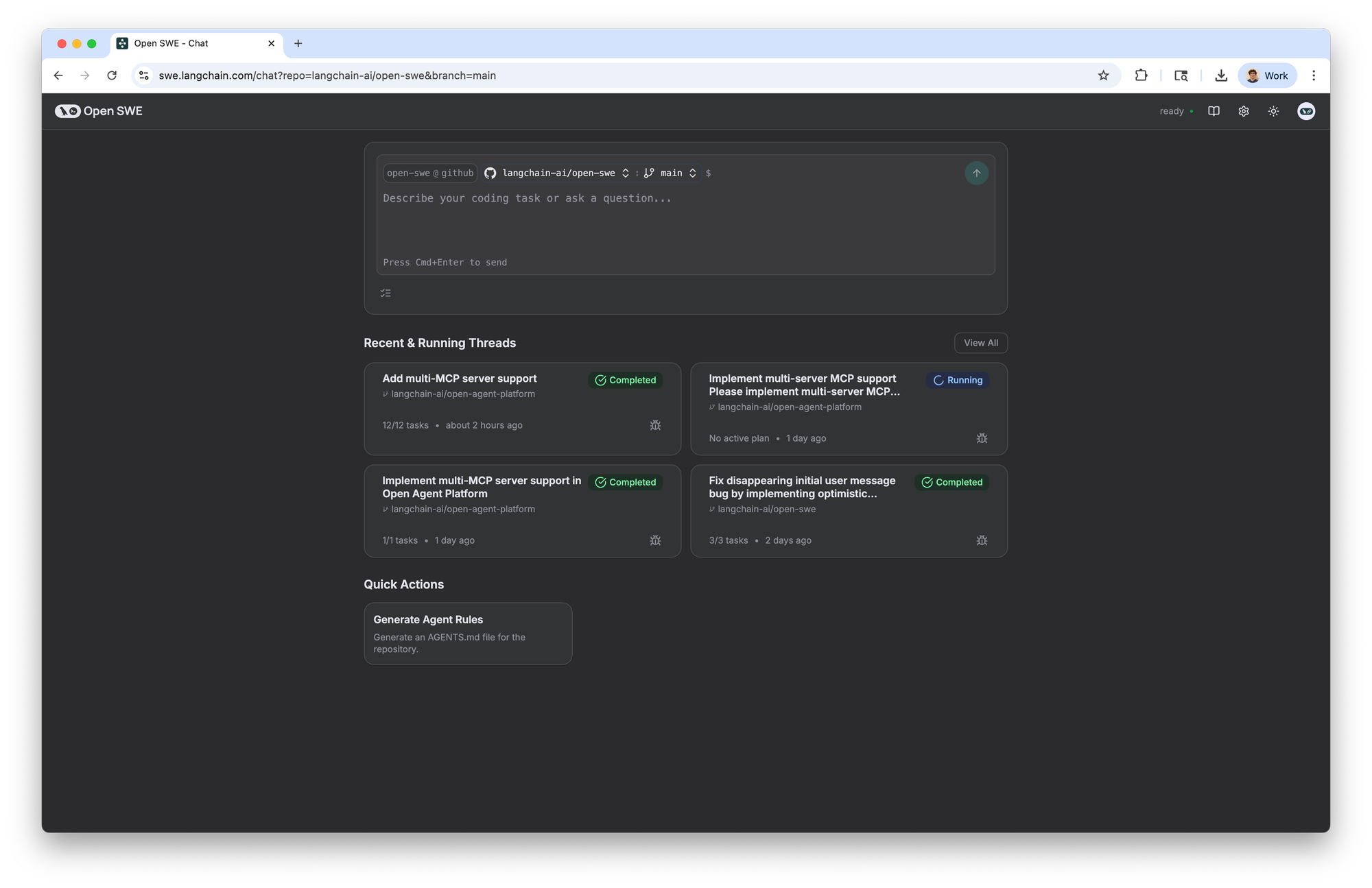
If you’re looking for a place to start, you can check out the examples page in our documentation.
如果你在寻找一个开始的地方,可以查看我们文档中的示例页面。
Why Open SWE? 为什么是 Open SWE?
There are a number of open source coding projects. Why built a new one? We wanted to drive attention and focus to aspects besides just the prompts and tools used.
现在有很多开源编程项目。为什么要再建一个新的?我们希望将关注点和焦点放在除了提示和工具之外的其他方面。
Specifically, we wanted to highlight more of the overall flow and UX that is needed to bring these agents to the point where we can interact with them in a reliable way.
具体来说,我们希望突出更多整体流程和用户体验,这些是让这些智能体达到我们可以可靠地与之交互的程度所必需的。
We think UI/UX is often the one of the more under-explored areas in agent building. The overall interaction pattern of your application can greatly determine the usage it gets.
我们认为,在智能体构建中,UI/UX 往往是较少被探索的领域。应用程序的整体交互模式可以极大地决定其使用情况。
With asynchronous agents being such a new idea, we think there are a lot of interesting patterns to explore here. Two main points are more control and deep integration.
异步代理作为一个全新的概念,我们认为其中有很多有趣的模式值得探索。主要有两点:更强的控制和深度集成。
Control: Open SWE has two main features that give you more control over your coding agent while it's running. You can interrupt the agent when you want to review work or nudge it back on track without restarting.
控制:Open SWE 具有两个主要功能,可以在代理运行时为您提供更多控制。您可以在需要时中断代理以审查工作,或在不需要重启的情况下将其引导回正轨。
- Human in the loop: When Open SWE generates a plan, it interrupts and gives you the chance to accept, edit, delete, or request changes to the plan. It missed something? Simply tell it to keep digging, and it’ll restart the planning process for your task.
人在回路中:当 Open SWE 生成计划时,它会中断并给您机会接受、编辑、删除或请求对计划的更改。它遗漏了什么?只需告诉它继续深入挖掘,它就会重新开始您的任务规划过程。 - Double texting: Most coding agents don’t support accepting new requests or feedback while they’re running. Open SWE doesn’t suffer from that constraint.
双工处理:大多数编码代理在运行时无法接受新请求或反馈。Open SWE 不受此限制。
If you change your mind on the product spec, want to add a new feature, or see it going off the rails, simply send it a message, and it’ll smoothly integrate that into its active session.
如果产品规格有变,想添加新功能,或发现其偏离轨道,只需向其发送消息,它将顺利将其整合到当前会话中。
Deeply integrated: Open SWE integrates directly with your GitHub account and repositories, so you can assign it work like any other developer and give it context to your code. Developers already live in GitHub, so why make them learn a new product?
深度集成:Open SWE 直接与您的 GitHub 账户和仓库集成,因此您可以像其他开发者一样分配任务,并为其代码提供上下文。开发者已经在 GitHub 上工作,为何还要让他们学习新产品?
With Open SWE, every new task is given a tracking issue. This issue is updated throughout the session with status updates, execution plans and more. When it completes a task, a pull request is automatically opened and linked back to the tracking issue.
使用 Open SWE,每个新任务都会分配一个跟踪问题。在会话期间,该问题会更新状态更新、执行计划等信息。当任务完成后,会自动打开一个拉取请求,并链接回跟踪问题。
You can also trigger runs directly from GitHub:
你也可以直接从 GitHub 触发运行:
- Simply add a label (e.g.,
open-swe-auto) to a GitHub issue, and Open SWE gets to work. When it’s done, it opens a pull request, ready for your review. It fits into your existing process, just like a human teammate.
只需在 GitHub 问题中添加一个标签(例如,open-swe-auto),Open SWE 就会开始工作。完成后,它会创建一个拉取请求,供你审查。它就像一个人类队友一样融入你的现有流程。
Besides these two core pillars, there are two other components we focused on. These focus less on the interaction pattern of humans with OpenSWE, but rather on how OpenSWE runs and does it work.
除了这两个核心支柱外,我们还关注了另外两个组件。这些组件较少关注人类与 OpenSWE 的交互模式,而是更多地关注 OpenSWE 的运行方式以及它是如何工作的。
- Runs in an isolated sandbox Every task runs in a secure, isolated Daytona sandbox. Since each Open SWE session is given its own sandbox, you don’t need to worry about malicious commands, and can let Open SWE execute any shell command it wants. This means we can move quicker, without requiring human approval for every command it wants to run.
在隔离的沙盒中运行 每个任务都在一个安全、隔离的 Daytona 沙盒中运行。由于每个 Open SWE 会话都有自己的沙盒,你无需担心恶意命令,可以允许 Open SWE 执行任何它想要的 shell 命令。这意味着我们可以更快地推进工作,无需为它想要运行的每个命令都获得人类批准。 - Runs asynchronously in the cloud: The cloud-native architecture means Open SWE can work on multiple tasks in parallel without consuming your local resources. You can assign it a list of tasks in the morning and come back to a set of PRs in the afternoon.
在云端异步运行:云原生架构意味着 Open SWE 可以在多个任务上并行工作,而不会消耗您的本地资源。您可以在早上分配它一个任务列表,然后在下午回来看到一组 PR。 - Plans and reviews before committing: Many agents jump straight to code, often leading to mistakes that break your CI pipeline. Open SWE uses a multi-agent architecture with dedicated Planner and Reviewer components. The Planner researches the codebase to form a robust strategy first. After the code is written, the Reviewer checks for common errors, runs tests and formatters, and reflects on the changes before ever opening a PR.
提交前进行计划和审查:许多代理直接跳到编码,这通常会导致破坏您的 CI 管道的错误。Open SWE 使用具有专门的 Planner 和 Reviewer 组件的多代理架构。Planner 首先研究代码库以形成一个稳健的策略。代码编写完成后,Reviewer 检查常见错误,运行测试和格式化工具,并在打开 PR 之前反思这些更改。
We've found this is more effective at writing workable code with fewer review cycles.
我们发现这种方法在更少的审查周期内编写可用代码更有效。
Considerations: Open SWE is great for complex, longer running tasks. But for small one-liner bug fixes or simple style updates, this architecture is not optimal. For tasks like these, you want the agent to be able to skip the planning and reviewing stages, and jump right into execution.
注意事项:Open SWE 非常适合复杂、长时间运行的任务。但对于简短的行数错误修复或简单的样式更新,这种架构并不理想。对于这些任务,您希望代理能够跳过计划和审查阶段,直接进入执行。
We’re currently working on implementing a version of Open SWE which does just this. It runs locally via a CLI, and is more agentic, allowing it to choose whether or not it needs to plan or review its code.
我们目前正在开发一个 Open SWE 的版本,它正是这样运作的。它通过 CLI 在本地运行,并且更具主动性,允许它自行决定是否需要规划或审查其代码。
When this is done, Open SWE will be a true one-stop-shop for all engineering tasks, for anything from simple one-line style fixes, all the way to complete product implementation from scratch.
完成之后,Open SWE 将成为所有工程任务的真正一站式解决方案,从简单的单行样式修复,到从头开始完成完整的产品实现,无所不包。
How It Works: The Agent Architecture
工作原理:代理架构
Open SWE operates using three specialized LangGraph agents that work in sequence: a Manager, a Planner, and a Programmer (which contains a sub-agent Reviewer).
Open SWE 通过三个专门的 LangGraph 代理按顺序工作:一个管理器、一个规划器和一个程序员(其中包含一个子代理 Reviewer)。
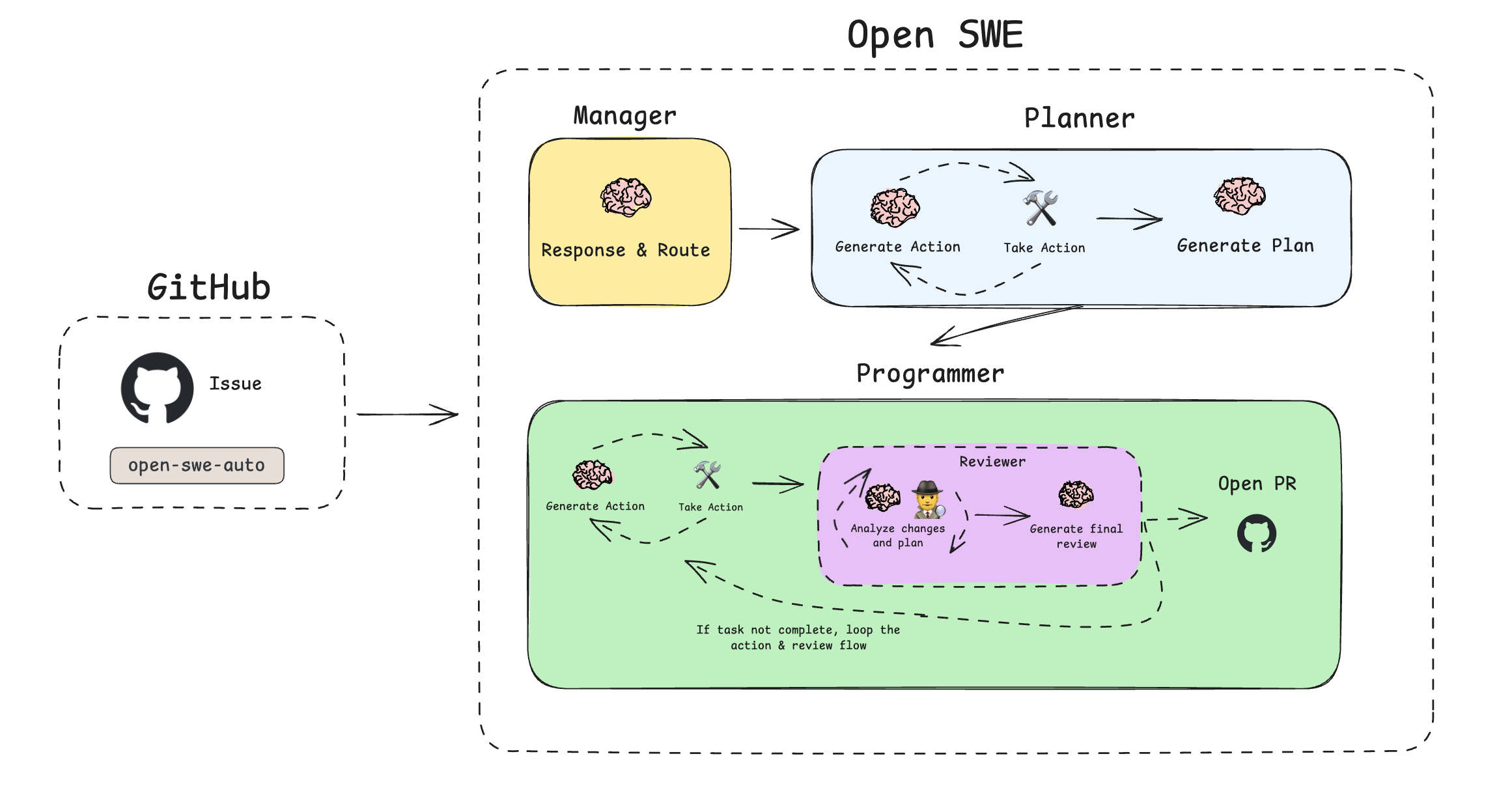
- Manager: This graph is the entry point. It handles user interactions and routes tasks. When you create a task, it initializes the state and passes control to the Planner.
管理器:这个图是入口点。它处理用户交互并路由任务。当你创建任务时,它会初始化状态并将控制权交给规划器。 - Planner: Before a single line of code is written, the Planner analyzes the request, researches the codebase by viewing files and running searches, and creates a detailed, step-by-step execution plan.
规划器:在编写任何一行代码之前,规划器会分析请求,通过查看文件和运行搜索来研究代码库,并创建一个详细的、逐步的执行计划。
By default, this requires a manual review step where you can edit, approve, or provide feedback on the proposed plan. If you’re feeling bold, however, you can skip this step.
默认情况下,这需要一个手动审核步骤,你可以编辑、批准或对建议的计划提供反馈。然而,如果你够大胆,可以跳过这个步骤。 - Programmer & Reviewer: Once a plan is approved, the Programmer executes each step in the sandbox. This includes writing code, running tests, and searching the web for documentation.
程序员 & 审核人:一旦计划获得批准,程序员将在沙盒中执行每个步骤。这包括编写代码、运行测试以及在网络上搜索文档。
When the Programmer completes its tasks, it hands off to the Reviewer, which analyzes the generated code for quality, correctness, and completeness. If issues are found, it sends the task back to the Programmer with feedback for another iteration.
当程序员完成任务时,它会将任务交给审查者,审查者分析生成的代码质量、正确性和完整性。如果发现问题,它会将任务反馈给程序员,并提供反馈以进行下一次迭代。
This action-review loop continues until the code is perfect.
这个行动-审查循环会持续进行,直到代码完美无缺。
Once the Reviewer approves the work, Open SWE generates a final conclusion, opens a pull request, and marks the task as complete.
一旦审查者批准工作,Open SWE 会生成最终结论,打开一个拉取请求,并将任务标记为完成。
Tech We Used: LangGraph and LangGraph Platform
我们使用的技术:LangGraph 和 LangGraph 平台
Open SWE is built on LangGraph, which allows us to have more control over each step in the workflow. Open SWE operates through four agents, each with their own state and unique inputs/outputs.
Open SWE 是基于 LangGraph 构建的,这使得我们能够对工作流程中的每个步骤有更多的控制权。Open SWE 通过四个代理运作,每个代理都有自己的状态和独特的输入/输出。
By using LangGraph, we’re able to easily orchestrate calling all of the agents, managing their state at any point in time, and handling edge error cases. In addition to the LangGraph framework, Open SWE is deployed on LangGraph Platform (LGP).
通过使用 LangGraph,我们能够轻松地编排调用所有代理,在任何时间点管理它们的状态,并处理边缘错误情况。除了 LangGraph 框架,Open SWE 还部署在 LangGraph 平台(LGP)上。
LGP is purpose built for long running agents (these agents can sometimes run for an hour at a time), comes with built in persistence (powering our human-in-the-loop features) and autoscales (so that we can kick of hundreds of agent runs if necessary).
LGP 是专门为长时间运行的代理(这些代理有时可以运行一个小时)而设计的,具有内置的持久化功能(支持我们的真人介入功能)和自动扩展(以便在必要时我们可以启动数百个代理运行)。
Refined with LangSmith 使用 LangSmith 进行优化
Open SWE is a complex multi-agent system. The main challenge in getting this system to be useful was making sure that the results it produced were accurate enough. The biggest challenge with this was context engineering. Did it have the correct instructions on how to use the tools? Was it fetching the right context? If we changed those instructions, how would the performance change?
Open SWE 是一个复杂的分布式系统。让这个系统变得有用的主要挑战是确保它产生的结果足够准确。最大的挑战在于上下文工程。它是否具有正确的工具使用说明?是否获取了正确的上下文?如果我们更改这些说明,性能会如何变化?
In order to first debug context engineering, and then later to evaluate changes to context engineering, we used LangSmith - the leading AI observability and evaluation platform.
为了首先调试上下文工程,然后后来评估上下文工程的变更,我们使用了 LangSmith——领先的 AI 可观测性和评估平台。
Open Source and Extensible
开源与可扩展
We built Open SWE to be a powerful tool out of the box, but we're most excited about its potential as a foundation for the community. The entire project is open source, built on LangGraph, and designed to be extended.
我们打造 Open SWE 使其开箱即用,但我们更期待它作为社区基础的未来潜力。整个项目采用开源模式,基于 LangGraph 构建,并设计为可扩展。
You can fork the repository, customize the prompts, add new tools for your internal APIs, or modify the agent's core logic to fit your team's specific needs. Our developer documentation provides a detailed guide for setting up and deploying your own version.
您可以克隆仓库、定制提示词、为内部 API 添加新工具,或修改代理的核心逻辑以满足团队的特定需求。我们的开发者文档提供了详细的指南,帮助您设置和部署自己的版本。
We believe the future of software development will be collaborative between humans and agents. Open SWE is our first big step in building that future in the open.
我们相信软件开发的未来将是人类与代理协作共创。Open SWE 是我们公开构建这一未来的第一步。