Sign In 로그인
Welcome
Welcome to Dell
My Account
- Place orders quickly and easily
- View orders and track your shipping status
- Enjoy members-only rewards and discounts
- Create and access a list of your products
PowerEdge: How to change the Server Thermal and Fan Settings
PowerEdge: 서버 온도 및 팬 설정 변경 방법
Summary:
This article shows how to modify the PowerEdge Server Thermal settings and Fan Speed manually.
요약: 이 문서에서는 PowerEdge 서버의 온도 설정과 팬 속도를 수동으로 변경하는 방법을 보여줍니다.
This article applies to
This article does not apply to PowerEdge RAID Controller H755 Front SAS
이 문서는 PowerEdge RAID 컨트롤러 H755 전면 SAS에는 적용되지 않습니다. This article is not tied to any specific product. Not all product versions are identified in this article.
이 문서는 PowerEdge RAID 컨트롤러 H755 전면 SAS에는 적용되지 않습니다. This article is not tied to any specific product. Not all product versions are identified in this article.
PowerEdge RAID Controller H755 Front SAS
PowerEdge RAID Controller H755 Front SAS
Instructions 지침
Modifying Thermal Settings using iDRAC9 Web Interface
iDRAC9 웹 인터페이스를 사용하여 온도 설정 수정
To modify the thermal settings:
온도 설정을 수정하려면:
- In the iDRAC Web interface, go to Configuration > System Settings > Hardware Settings > Cooling Configuration.
iDRAC 웹 인터페이스에서 구성 > 시스템 설정 > 하드웨어 설정 > 냉각 구성으로 이동합니다.
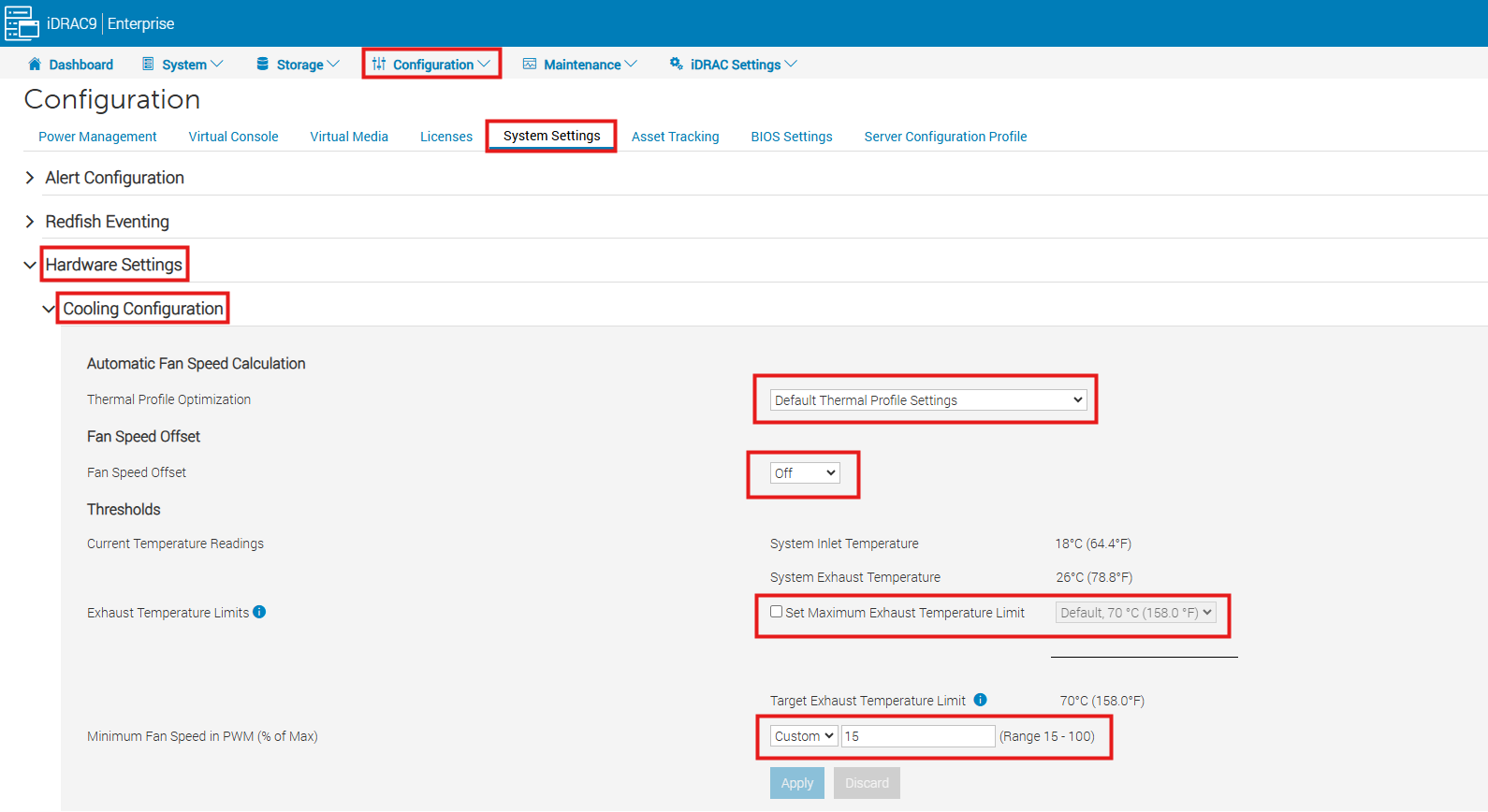
Specify the following: 다음 사항을 지정합니다.
- Thermal Profile Optimization — Select the thermal profile:
열 프로필 최적화 — 열 프로필을 선택합니다.- Default Thermal Profile Settings (Minimum Power) — Implies that the thermal algorithm uses the same system profile settings that are defined under System BIOS > System BIOS Settings > System Profile Settings page.
기본 열 프로필 설정(최소 전력) — 열 알고리즘이 시스템 BIOS > 시스템 BIOS 설정 > 시스템 프로필 설정 페이지에 정의된 것과 동일한 시스템 프로필 설정을 사용함을 의미합니다. - Maximum Performance (Performance Optimized):
최대 성능(성능 최적화):- Reduced probability of memory or CPU throttling
메모리 또는 CPU 스로틀링 가능성 감소 - Increased probability of turbo mode activation
터보 모드 활성화 가능성 증가 - Generally, higher fan speeds at idle and stress loads.
일반적으로 유휴 및 스트레스 부하 시 팬 속도 증가
- Reduced probability of memory or CPU throttling
- Minimum Power (Performance per Watt Optimized):
최소 전력(와트당 성능 최적화):- Optimized for the lowest system power consumption based on optimum fan power state
최적의 팬 전력 상태를 기반으로 시스템 전력 소비를 최소화하도록 최적화됨 - Generally, lower fan speeds at idle and stress loads.
일반적으로 유휴 및 스트레스 부하 시 팬 속도가 낮아집니다.
- Optimized for the lowest system power consumption based on optimum fan power state
- Sound Cap - Sound Cap provides reduced acoustical output from a server at the expense of some performance. Enabling Sound Cap may include temporary deployment or evaluation of a server in an occupied space, but it should not be used during benchmarking or performance sensitive applications.
사운드 캡(Sound Cap) - 사운드 캡은 성능을 일부 희생하여 서버의 음향 출력을 줄여줍니다. 사운드 캡을 활성화하는 것은 사람이 있는 공간에서 서버를 일시적으로 배포하거나 평가하는 경우에 해당할 수 있지만, 벤치마킹 또는 성능에 민감한 애플리케이션에는 사용해서는 안 됩니다.- Note: The sound Cap option is not available on all models
참고: 사운드 캡 옵션은 모든 모델에서 사용할 수 있는 것은 아닙니다.
- Note: The sound Cap option is not available on all models
- Note: Selecting Maximum Performance or Minimum Power, overrides thermal settings associated to System Profile setting under System BIOS > System BIOS Settings. System Profile Settings page
참고: 최대 성능(Maximum Performance) 또는 최소 전력(Minimum Power)을 선택하면 시스템 BIOS > 시스템 BIOS 설정(System BIOS Settings) 아래의 시스템 프로필 설정(System Profile setting)과 관련된 열 설정이 재정의됩니다. 시스템 프로필 설정 페이지
- Default Thermal Profile Settings (Minimum Power) — Implies that the thermal algorithm uses the same system profile settings that are defined under System BIOS > System BIOS Settings > System Profile Settings page.
- Maximum Exhaust Temperature Limit — From the drop-down menu, select the maximum exhaust air temperature. The values are displayed based on the system.
최대 배기 온도 제한 — 드롭다운 메뉴에서 최대 배기 공기 온도를 선택합니다. 값은 시스템에 따라 표시됩니다.- This option allows the system fans speeds to change such that the exhaust temperature does not exceed the selected exhaust temperature limit. This cannot always be guaranteed under all system operating conditions due to dependency on system load and system cooling capability.
이 옵션을 사용하면 배기 온도가 선택한 배기 온도 제한을 초과하지 않도록 시스템 팬 속도를 변경할 수 있습니다. 시스템 부하 및 시스템 냉각 기능에 따라 달라지므로 모든 시스템 작동 조건에서 항상 보장할 수는 없습니다.
- This option allows the system fans speeds to change such that the exhaust temperature does not exceed the selected exhaust temperature limit. This cannot always be guaranteed under all system operating conditions due to dependency on system load and system cooling capability.
- Fan Speed Offset - Selecting this option allows additional cooling to the server. In case hardware is added (example, new PCIe cards), it may require additional cooling. A fan speed offset causes fan speeds to increase (by the offset % value) over baseline fan speeds calculated by the Thermal Control algorithm. Possible values are:
팬 속도 오프셋 - 이 옵션을 선택하면 서버에 추가 냉각이 가능합니다. 하드웨어(예: 새 PCIe 카드)가 추가되는 경우 추가 냉각이 필요할 수 있습니다. 팬 속도 오프셋은 열 제어 알고리즘에 의해 계산된 기준 팬 속도보다 팬 속도를 증가시킵니다(오프셋 % 값만큼). 가능한 값은 다음과 같습니다.- Low Fan Speed - Drives fan speeds to a moderate fan speed.
낮은 팬 속도 - 팬 속도를 적당한 팬 속도로 구동합니다. - Medium Fan Speed - Drives fan speeds close to medium.
중간 팬 속도 - 팬 속도를 중간에 가깝게 구동합니다. - High Fan Speed - Drives fan speeds close to full speed. Max Fan Speed — Drives fan speeds to full speed.
높은 팬 속도 - 팬 속도를 최대 속도에 가깝게 구동합니다. 최대 팬 속도 - 팬 속도를 최대 속도로 구동합니다. - Off - Fan speed offset is set to off. This is the default value. When set to off, the percentage does not display. The default fan speed is applied with no offset. Conversely, the maximum setting results in all fans running at maximum speed.
꺼짐 - 팬 속도 오프셋이 꺼짐으로 설정됩니다. 이것이 기본값입니다. 꺼짐으로 설정하면 백분율이 표시되지 않습니다. 기본 팬 속도는 오프셋 없이 적용됩니다. 반대로, 최대 설정은 모든 팬이 최대 속도로 작동하게 합니다.
- Low Fan Speed - Drives fan speeds to a moderate fan speed.
- Thresholds: 임계값:
- Maximum PCIe Inlet Temperature Limit — Default value is 55°C. Select the lower temperature of 45°C for third party PCIe cards which require a lower inlet temperature.
최대 PCIe 흡기 온도 제한 — 기본값은 55°C입니다. 더 낮은 흡기 온도가 필요한 타사 PCIe 카드에는 45°C의 더 낮은 온도를 선택하십시오. - Exhaust Temperature Limits — By modifying the values for the following you can set the exhaust temperature limits:
배기 온도 제한 — 다음 값을 수정하여 배기 온도 제한을 설정할 수 있습니다.- Set Maximum Exhaust Temperature Limit
최대 배기 온도 제한 설정 - Set Air Temperature Rise Limit
공기 온도 상승 제한 설정
- Set Maximum Exhaust Temperature Limit
- Maximum PCIe Inlet Temperature Limit — Default value is 55°C. Select the lower temperature of 45°C for third party PCIe cards which require a lower inlet temperature.
- Minimum Fan Speed in PWM (% of Max) — Select this option to fine-tune the fan speed. Using this option, you can set a higher baseline system fan speed or increase the system fan speed if other custom fan speed options are not resulting in the required higher fan speeds.
최소 팬 속도(PWM, 최대값의 %) — 이 옵션을 선택하여 팬 속도를 미세 조정합니다. 이 옵션을 사용하면 더 높은 기준 시스템 팬 속도를 설정하거나, 다른 사용자 지정 팬 속도 옵션으로 인해 필요한 더 높은 팬 속도가 나오지 않는 경우 시스템 팬 속도를 높일 수 있습니다.- Default — Sets minimum fan speed to default value as determined by the system cooling algorithm.
기본값 — 시스템 냉각 알고리즘에 따라 결정된 기본값으로 최소 팬 속도를 설정합니다. - Custom — Enter the percentage by which you want to change the fan speed.
사용자 지정 — 팬 속도를 변경하려는 백분율을 입력합니다.
- Default — Sets minimum fan speed to default value as determined by the system cooling algorithm.
- Click Apply to apply the settings.
설정을 적용하려면 적용을 클릭합니다.- The following message is displayed: It is recommended to reboot the system when a thermal profile change has been made. This is to ensure all power, and thermal settings are activated.
다음 메시지가 표시됩니다. 열 프로필이 변경된 경우 시스템을 재부팅하는 것이 좋습니다. 이는 모든 전원 및 열 설정이 활성화되도록 하기 위함입니다. - Click Reboot Later or Reboot Now.
나중에 재부팅 또는 지금 재부팅을 클릭합니다.Note: You must reboot the system for the settings to take effect.
참고: 설정이 적용되려면 시스템을 재부팅해야 합니다.
- The following message is displayed: It is recommended to reboot the system when a thermal profile change has been made. This is to ensure all power, and thermal settings are activated.
Additional Information 추가 정보
To modify the thermal settings using racadm you can reference the IDRAC User's Guide
racadm 을(를) 사용하여 온도 설정을 수정하려면 iDRAC 사용 설명서를 참조하십시오.
Affected Products 영향을 받는 제품
iDRAC9, PowerEdge R240, PowerEdge R250, PowerEdge R260, PowerEdge R340, PowerEdge R350, PowerEdge R360, PowerEdge R440, PowerEdge R450, PowerEdge R540, PowerEdge R550, PowerEdge R640, PowerEdge R6415, PowerEdge R650, PowerEdge R650xs, PowerEdge R6515
, PowerEdge R6525, PowerEdge R660, PowerEdge R660xs, PowerEdge R6615, PowerEdge R6625, PowerEdge R740, PowerEdge R740XD, PowerEdge R740XD2, PowerEdge R7415, PowerEdge R7425, PowerEdge R750, PowerEdge R750XA, PowerEdge R750xs, PowerEdge R7515, PowerEdge R7525, PowerEdge R760, PowerEdge R760XA, PowerEdge R760xd2, PowerEdge R760xs, PowerEdge R7615, PowerEdge R7625, PowerEdge R840, PowerEdge R860, PowerEdge R940, PowerEdge R940xa, PowerEdge R960, PowerEdge T140, PowerEdge T150, PowerEdge T160, PowerEdge T340, PowerEdge T350, PowerEdge T360, PowerEdge T440, PowerEdge T550, PowerEdge T560, PowerEdge T640
...
Article Properties
Article Number: 000257346
Article Type: How To
Last Modified: 25 Apr 2025
Version: 2
Find answers to your questions from other Dell users
Support Services
Check if your device is covered by Support Services.